The Nubitx currency exchange hack and the loss of more than $ 5 million of Iranian users’ assets have made many users think of transferring their assets to safer and more reliable currency exchanges. If you are also planning to move your tires from Nubitx to a reliable currency exchange like Bitupin, don’t miss this guide. In the following, we have explained the tutorial on the removal of the Nubitx and the transfer of it to the bitpine as a step -by -step and step -by -step manner.
Why do some users move their tets from Nubitx to bitpin?
Recent events, including the extensive Nubitx currency exchange hacking and the restrictions on international internet access, have raised concerns for Iranian users active in the field of digital currency.
Theft of more than $ 5 million from Nubitx and the inability of users to manage and exit their assets at the time of the national Internet has led many users to think about removing their tires from the currency exchange and transferring it to a safer hospital.
While internet constraints made it difficult to access different platforms, and in addition to Nubitx, numerous other non -active currency exchanges were uninterrupted, and as always, users could continue their activities, including digital currency sales and sales. This has led many users to decide to move their tires from Nubitx to Bitupin.
But what is the transfer of Tetr from Nubitx to Bitupin? In the following, we have examined the step -by -step tutorial on the tutorial of the Nubitx. We suggest that you must read the reader before reading The price of the momentary tetrone Check the bitpine platform.
Step by step tutorial on transmission from Nubitx to Bitupin
To move the Tetter from the Nubitx to the Bitup’s digital currency exchange, just follow the steps below.
Login to Nubitx and select the encrypted harvesting option
To move the Tetter from Nubitx to Bitupin, you must first log in to your Nubitx currency exchange account and select the harvest option (encrypted harvest) on the homepage above.
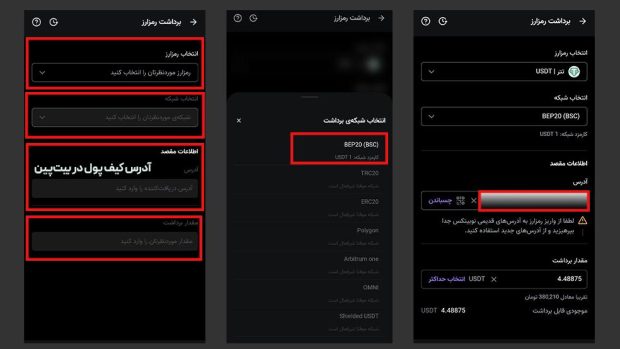
Entering encrypted information to transfer the tetter from Nubitx
In the next step, you should specify the following in the relevant boxes:
- The desired encryption (Tetter)
- Tarter Transmission Network
- Their destination wallet address (Bitupin’s wallet address)
- Transfer the amount you want.
Note that the selected network in the Nubitx currency exchange must be exactly the same as the network you choose in the bitpine (the transfer destination). For example, if you have a BEP20 platform on the Nubitx, you should also select the BEP20 network as the destination network. Below (Step 1), we have taught how to get the Bitupin wallet address to receive the Tetron.
Select Network and Destination Address (Bitupin)
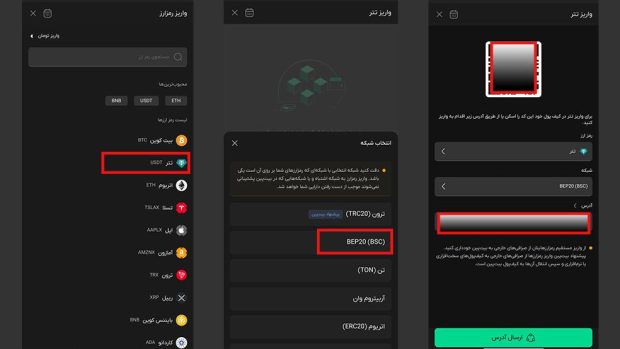
To enter your destination wallet address at the Nubitx currency exchange, you need to get this address from Bitupin. Follow the steps below to do this:
- Sign in or register your account in your BitPin currency exchange. (Quick Sign Up in Bit PIN)
- On the homepage, select the deposit and then the encrypted deposit.
- In the search or list of Ramsar, select USDT.
- As you can see in the picture below, different networks are selected to get the tetra. If you have selected the BEP20 network at the Nubitx, here you need to select the BEP20 network.
- After selecting the network, the wallet’s address will be displayed to you.
Transfer from Nubitx to Bitupin
Once you receive the Tartar’s destination wallet address, you need to follow the following steps to complete your transaction.
- Copy the address you received in the BitPin currency exchange and re -enter the Nubitx currency exchange.
- Go to the encrypted harvesting section and enter your bitpine wallet address in the destination information box (Photo Step 2 we have shown above).
- After entering the destination address, in order to successfully transfer the Tetrone to Bitupin, you need to enter and approve the two -factor code you receive in special software such as Google Authenticator.
How much time does it take to deposit from Nubitx to bitpin?
Transmission from Nubitx to bitpin is usually done within minutes, but the duration of the transmission depends on the bustle of the origin network (Nubitx).
Given the recent Nubitx currency exchange hack, there is a possibility of delaying deposit and harvesting operations, and this process may take more time than normal as well as other currency exchanges such as bitpine.
As mentioned in the tutorial section of the Nubitx Tutorial, you need to enter the two -factor verification code (2FA) to finalize the harvest. If you have not already enabled this feature and want to enable it at the same time as the Tetron Harvesting request, the transaction will be delayed for an hour and will not be finalized immediately.
Transfer fee from Nubitx to Bit Pin
You can use a variety of networks such as the Tron20, Ethereum (ERC20) and the Baynens Smart Chain (BEP20) to purchase, sell and transfer Tetra to BitPin. The fee depends on the network you choose; For example, transmission of the tetter through the Tron network usually has much less commission than the ethereum network. In addition to the network fee, part of the cost is also related to the digital currency exchange. In the meantime, the bitpin platform offers less commission than other Iranian currency exchanges.
Important security tips at the time of digital currency transfer
When moving from Nubitx to Bitupin and to maintain the security of your assets, you need to consider important security tips, including:
Careful examination of destination address and network matching
As we mentioned above, the digital Tetter currency (USDT) can be transmitted to various networks. One of the most important things to keep in mind when transferring a tetrone to bitpin is the correspondence of the source and destination network.
In other words, the network that is transmitted from the tetter must be the same as the network you choose at the destination. For example, if your tires are on the source platform on the BEP20 or TRC20 network, you should enter the Tetrone address of the same network, the BEP20 or TRC20 so that the transfer is successfully done and your assets are not eliminated.
Use of two -step authentication
Other important things to consider when transferring a tetter to bitpin are two -step authentication. TWO-Factor Authentication (2FA) authentication means that you are not enough to enter an account or to carry out the currency, and you need to enter a second security code after entering the password.
Using this feature makes it even if a person understands your password, without accessing your device (for example, your mobile), or transactions.
The importance of registering and maintaining transaction hash (TXID)
Transaction hash (TXID) is the unique ID of any transaction conducted on the blockchain network that allows it to be observed and tracked. TXID registration and maintenance is important to prove the transaction, track its status and financial transparency. You can also use the transaction hash to check your digital asset status when your deposit process is faced with error or in the event of other similar events.
Useful users’ repeated questions about transmitting tetra to bitn
- Do I have to choose a specific network to move the Tare from Nubitx to Bitupin?
When transferring the tetter from Nubitx to Bitupin, the Tetrone Network must be the same as the destination and destination. That is, if you choose the Tron Network in Nubitx to transfer your tets, you should also use your Tron address to get your Tron address.
- What happens if I incorrectly enter the wallet address?
If you mistakenly enter the address of the wallet when transferring your tetter to Bitup, instead of entering your wallet address, one of the three modes may occur:
- If the wrong address is valid, the tet is transferred to the same address and usually cannot be returned.
- If the address is invalid, the transaction will not be done and your asset will be returned or faced with error.
- If you choose the wrong network, your currencies may be lost or that it is very difficult and time consuming and you will also have to pay an extra.
- How long does the transfer of the tetter from Nubitx to bitpin?
Transfer from Nubitx to bitpine has no fixed time and depends on the bustle and function of the source network, namely Nubitx. Currently, this process is delayed, given the Nubitx hack.
(tagstotranslate) digital currency

RCO NEWS