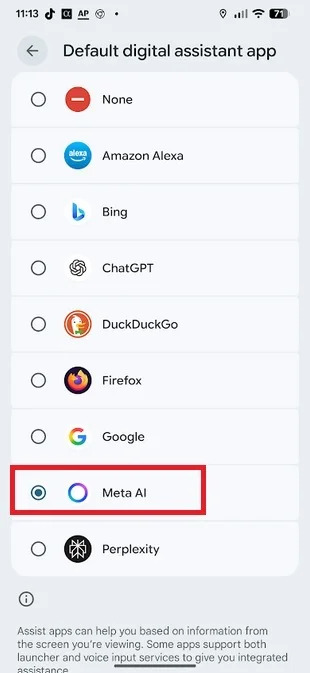
Do you use Google Assistant as your default virtual assistant on Android? Do you want to replace another Jama’a option? If you have installed the latest version of the Meta AI app with an ID of 1.2.1.1.1 or higher on your phone, you will learn how to convert your phone to a new device with a few fast strokes.
Download and install this app first through the Play Store, then check which version you run. To do this, just go to Settings> Apps> See All Apps and select the Meta AI app to open the information page. To view the app’s version number on your phone, go to the bottom of that page. It is reiterated that to use this tutorial, you will need to install version 4.3.1.1 or higher Meta AI.
If the Meta AI version version is suitable, go to Settings> Apps> Default Apps> Digital Assistant to show you a list of Android Digital Assistant Apps. You can now select the right version of the Meta AI you have installed. The listing lists includes the following:
- None
- Alexon Alexa
- Bing
- Chatgpt
- Duckduckgo
- Firefox
- Meta AI
- Perplexity
If you want to try Meta AI, tap the button next to the name to select it. Keep in mind that choosing this app as a default digital assistant on your Android phone only will open it, which is equivalent to hitting the Meta AI. This app doesn’t open to display the interface, so you can’t open it, start typing, or tell the question you want to answer or what you need to do. In addition, the app does not work with the audio input.
Although it is not possible to open the Meta AI app and use the audio input, you can use the audio input feature on the QWERTY keyboard. However, it may arise as to what is the use of Meta AI as a digital assistant compared to other options such as Google Assistant, Jamina, GPT chat, etc. With this app, you will be able to ask it through text messages to make a photo or video. By connecting to Meta, this feature can even create a rail to share it on Instagram, Facebook and WhatsApp accounts.
It is worth noting that all of these platforms belong to Meta. If you have enabled this feature and select Meta AI as the default assistant assistant of your Android phone, the app will open with the long pressing of the power button. If you are using the old three -button Navari system, you can touch the Home button and you have. To run Meta when the gestures are active, you need to pull your finger from one of the lower corners of the screen.
Jamina may be the best digital assistant in Android

When you choose Meta AI as your default digital assistant, you can get the answers generated by artificial intelligence for your questions. If you want to set the timer or alarm alarm, you need to open the Clock app on your Android phone to adjust the timer or alarm. Of course, some users prefer to use Jina as a digital assistant on their pixel phone. You have to do this by opening the Google app and hitting the personal icon in the upper right corner.
Then go to Settings> Gemini> Digital Assistances from Google and select a gamina. Keep in mind, however, that you still need to use the phrase “Hello Google” to open a gamina. Also make sure that you have selected Google as your default digital assistant, because there is no separate option for Jina. Although this artificial intelligence is great to answer questions, it can adjust alarms or time if you ask it through the audio input. The Jamina does this with the help of Google Assistant Assistant.

RCO NEWS