The Circle to Search feature is one of the coolest Android features that allows you to search for anything on the screen by dragging a circle around it. But Google is not satisfied with this and now wants to add artificial intelligence capabilities directly to this tool with a new update to provide a smoother and smarter user experience.
According to PhoneArena, until now if you had another question after the initial Circle to Search search, you had to go to the search bar at the top of the screen. But in the new beta version, Google has added the AI Mode feature. When you draw a line around an item, a new panel will open that includes an AI Overview and a description of that item. More importantly, a search bar has been added at the bottom of the page that reads: Ask anything.
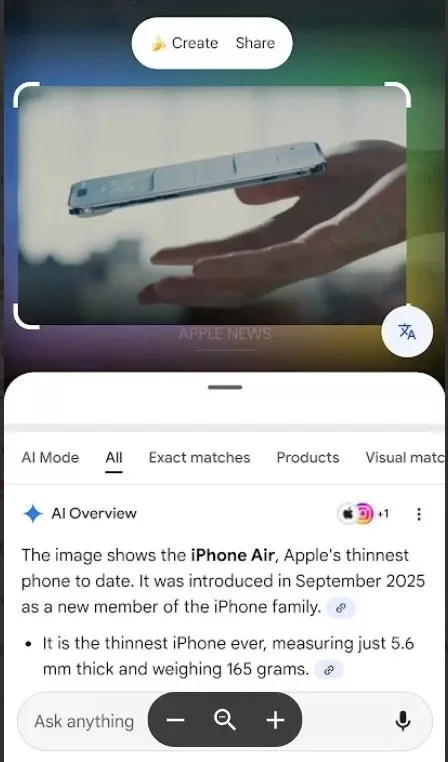
This change has two big advantages: First, the search bar has been moved to the bottom, which is much easier to operate with one hand (especially on large phones). The second advantage is that you can see the image search results and ask additional questions to the AI at the same time, without the need to switch between pages.
Artificial intelligence in Google Circle to Search
This feature is currently seen in the beta version of the Google application (version 16.47). If you are a user of Android 16 beta version (QPR2), you probably have this feature enabled. To check it:
- Hold down the bottom bar to activate Circle to Search.
- Draw a line around an item.
- Check if the AI description and Ask anything search bar appear at the bottom of the screen.

RCO NEWS