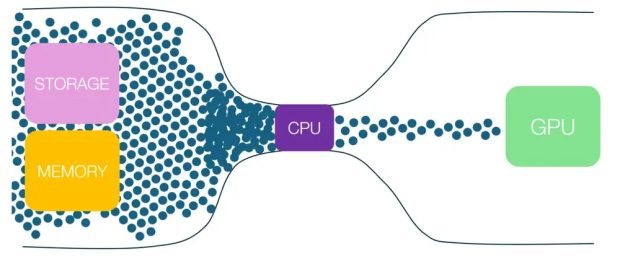
Many users spend all their focus and budget on buying a powerful graphics card, unaware that a weak CPU (CPU) can draw all the potential to the water, like an anchor. This phenomenon, known as the CPU or CPU Bottleneck, restricts the overall performance of the system and prevents the desired frame rate.
If you intend to promote and look for the best Selling second -hand graphics card You are, recognizing this concept is critical. Store Testing By providing a 4 -day test consultation and deadline, it will help you choose tailored and bothered pieces.
What is CPU Bottleneck?
Imagine in a car manufacturing plant, the assembly line is capable of producing 4 cars per hour, but the supply section (processor) can only provide the necessary parts for 4 cars. In this scenario, despite the high ability of the assembly line, the factory’s final output is limited to 4 cars. This is precisely what happens in the processor throat phenomenon.
The processor is responsible for managing the logic of game, artificial intelligence, physics, and preparing the Draw Calls render instructions. If your graphics card is powerful enough to render the frames faster than what the CPU is able to prepare them, the graphics card will have to wait for the CPU. As a result, you will be faced with a drop in frame, stuttering, and the lack of full use of your GPU ability. This problem, especially at lower resolutions such as the 1080p, which is more pressure on the CPU, is more likely to be.
How to detect CPU bottle?
Diagnosis of CPU bottleneck is not a complex task and can be easily identified using performance monitoring tools.
- Use Monitoring Software: Software like MSI Afterburner With Rivatuner Statistics Server They are standard tools for this. After installing and setting up, enter your desired game and consider the percentage of usage from the CPU and GPU.
- Analyzing Percentage of Use:
- GPU USage close to 1 % and CPU Usage Low: This is ideal and shows that your graphics card is using all your power and there is no throat from the CPU.
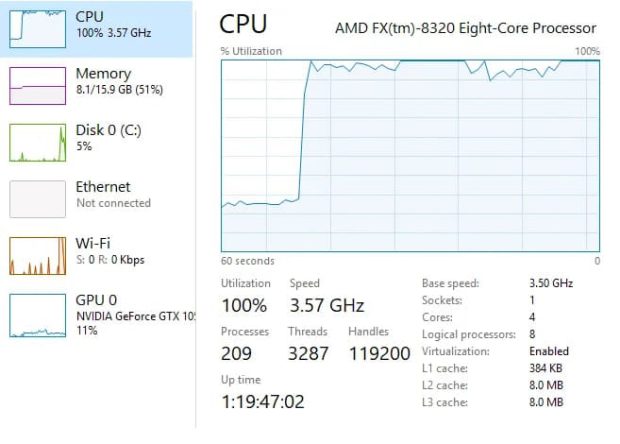
- CPU USage close to 1 % and low GPU usage (eg 1-5 %): This is the classic symptom of the processor bottleneck. Your processor is hard to work, but it can’t provide enough data to finish your powerful graphics card.
- Low use of both pieces: This may be due to the location of the game’s frame rate (V-Sync) or the game itself poorly optimized.
The impact of resolution on the throat phenomenon
One of the key points about the processor bottleneck is its direct resolution.
- 1080p resolution: In this resolution, the graphics card renders the frames at a very high speed. This high speed requires the quick preparation of the CPU instructions. For this reason, the pressure on the processor is maximized at 1080p and the probability of the CPU bottleneck is very high.
- A resolution of 1440p and 4K: As the resolution increases, the number of pixels that the graphics card needs to be processed is greatly increased. This takes more time than the GPU and gives the CPU the opportunity to reach it. As a result, as the resolution increases, the pressure is removed from the CPU and moved to the GPU and reduced the probability of the processor bottleneck.
Introducing Balanced combinations of CPU, GPU and Power (PSU)
Choosing a balanced combination is the key to achieving the best performance. The following table provides several proposed combinations for different levels of budget and performance. Note that The price of the used graphics card It can make these compounds much more achievable.
| Performance level | CPU (CPU) | Graphic Card (GPU) | Power -suggested power (PSU) |
| Economic (Entry-Level 1080p) | Intel Core i3-12100F / AMD Ryzen 5 5500 | NVIDIA RTX 3050 / AMD RX 6600 | 550w |
| Mid-Raid (Mid-Range 1080p/1440p) | Intel Core i5-12400F / AMD Ryzen 5 5600X | NVIDIA RTX 3060 Ti / AMD RX 6700 XT | 650W |
| High (High-end 1440p/4K) | Intel Core i5-13600K / AMD Ryzen 7700X | NVIDIA RTX 4070 / AMD RX 7800 XT | 750W |
| Flagship (Flagship 4K) | Intel Core i9-13900K / AMD Ryzen 9 7950X | NVIDIA RTX 4080 / AMD RX 7900 XTX | 850W – 1000W |
Important point: The proposed power of the power is based on high quality and standard models (at least 80plus bronze). It is always best to choose a little higher than your system to ensure its stability in the long run.
Did you always have to worry about the bottleneck?
The short answer is no. There is always a level of throat in any system; Sometimes the CPU is restrictive and sometimes GPU. The main purpose is to minimize this imbalance and ensure that your expensive piece (usually graphics card) can work with its maximum power. If you are a competitive gamer looking at the 1080p resolution of 1 Hz frame rate, a powerful CPU is vital to you. But if you play at 4K resolution at 4 Hz frame rate, the importance of the CPU is reduced and the power of the GPU is the first word.
Smart upgrade: How to choose the right piece?
If you are facing a processor bottle problem, two main ways are you:
- CPU upgrades: This is the main solution. Look at your motherboard platform (socket and chipset) and see what is the strongest processor it supports. Sometimes a simple upgrade from a Core i3 to a Core i7 in a generation can make a significant difference.
- Increased resolution: If your monitor is capable of supporting, playing at higher resolution can remove pressure from the CPU and transfer to GPU, thereby using your graphics card power better.
Before any upgrades, investigations into the case How to sell the graphics card Your older can help provide part of the budget for the new piece. Platforms such as testing make this process simple and secure.
Conclusion
The concept of a processor bottleneck should not scare you, but should act as a guide to building a balanced system. Investing on the most expensive graphics card, regardless of the processor power, is to waste money. By researching, using monitoring tools, and smart selection of components, you can make sure that every rial you spend will lead to a direct improvement of your gaming experience. For a safe and clever sale, visit the specialized reference of second -hand graphics cards Testing With the 2 -day test deadline, the best option is to get started.
Frequently asked questions
. Does the processor bottleneck damage the parts? No, the bottleneck is a functional limit and does not cause any physical damage to your processor or graphics card.
. Can CPU overclocking can remove the bottleneck? Yes, overclocking can improve the performance of the processor and reduce the bottleneck, but it requires proper cooling and technical knowledge.
. Does RAM have an effect faster on CPU bottleneck? Yes, especially in the AMD Ryzen processors, the use of faster RAM with low delay can significantly improve CPU performance and reduce the bottleneck.
. What can I do to sell my old graphics card? The best way is to use reputable platforms such as testing that secure the sales process and provide access to real buyers.
(tagstotranslate) ad report

RCO NEWS