We know the Duct Split with its high power, but have you ever wondered why some spaces do not cool even with the Split dock, or why does the Split Duct power skyrocketing? All of this is the wrong result in setting the Duct Split for summer. Many of us think that just by pressing a few buttons on the remote, the automatic device manages everything, but unaware that incorrect settings can both reduce the quality of the cooling and damage the device.
Set the Split Duct Temperature for Summer
We go straight to the point to learn how to adjust the temperature of the Duct Split for the summer.
2. Incidentally heating mode
The first step in preparing the Duct Split is to turn off the heating mode. If your device is connected to a heating system like a hot water coil, it is best to do so to the repairman. Disabling heating causes the device to put all its energy on cooling the environment and not excess pressure on the parts. This step can be united with the periodic service of the device so that your overall system health is comfortable.
2- Discharge of hot water coil
One of the important things that is sometimes overlooked is the removal of the remaining water in the hot water coil. If this water stays in the system, it can cause the pipes to rust or damage the tank and repair it will cost you a lot. To do this, just open the coil drain valve and wait until you make sure that there is no water left in the system.
3- Cleaning or replacing filters
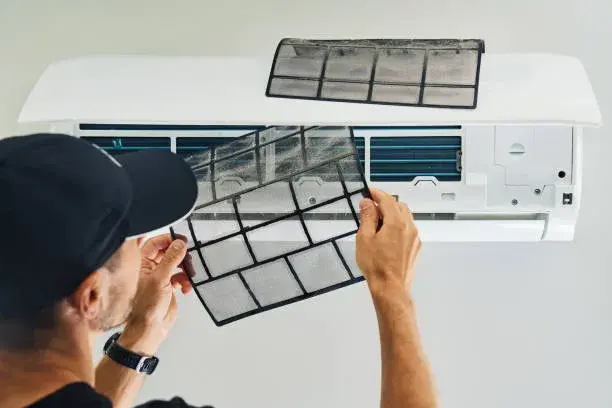
Split duct filters are like the lungs of the device. If they are dirty, they push the compressor and increase power consumption. Remove the internal unit filters and the back of the external unit and rinse on a surface containing lukewarm water and a mild detergent. Just remember if the filters are too old or torn, be sure to replace them.
4- Cleaning the radiator fan
The radiator fan is responsible for transferring cool air into the house, so it must be clean. Clean the fan blades gently with a soft napkin and a little detergent such as glass liquid. Just be careful that the blades are delicate and should not bend or break. This simple task will make the device work with all its power and the excess dust is not spread to the home environment.
2- Refrigerated gas check and charge
At this point, it comes to refrigerant gas that needs to be examined. Because if it is low, the device cannot cool the environment well and may even damage the compressor. Symptoms such as freezing the internal panel, the production of hot winds instead of cool, or continuous shutdown of the machine are gas shortages. Be sure to ask a skilled repairman to check the refrigerant gas level and charge it if needed. If you have just installed the device, take this review more seriously, as sometimes new devices may not have enough gas.
6. Adjust the cooling mode and the appropriate temperature
Now everything is ready and you can adjust the device to the cool or cooling mode with a remote control. Just be careful about a few tips. For example, try pulling the curtains throughout the day so that the sunlight does not bring extra heat to the house. Or if you use a splot duct in large rooms, put the fan speed on a medium or high mode to make the cooling better. Also, check the filters every few months and again, if necessary.
Set the Split Duct for summer from the display

The Duct Split display can help you adjust the Duct Split. Because whatever you want to do, he commands it. So you need to know exactly what each button has and when you should use it. To get started, turn on the device with the Power button. This button is located in most models on the remote control and in some models it is seen next to the internal panel. Until the display light is turned on, the Split dock will not be active.
The next step is the selection step of the function mode. You will encounter the following situations every time you press this button.
- Cool mode: The main in the summer.
- FAN mode: If you only want to circulate the air without changing the temperature, use this.
- DRY Mode: Suitable for shameful areas; This option absorbs excess air humidity.
- Auto mode: The device adjusts the temperature by ambient temperature.
With + and – you can adjust the desired temperature and place the fan speed on one of the low, medium or high states with the Fan Speed key. If you have just turned on the device and the space is too hot, first adjust it to a lot and return to the medium after the space is cooled.

Iran Radiator Duct Settings
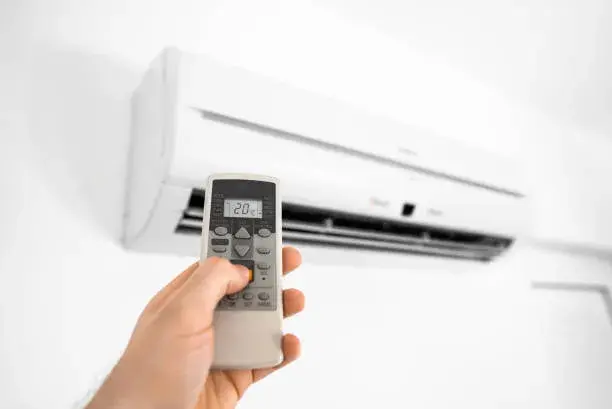
1. The first step in how to adjust the cooling of the Split Duct is to choose the cooling mode. Remove the remote and press the Mode button several times to reach the Cool mode. This is indicated by the snow seed mark.
2. You must then adjust the appropriate temperature. We recommend that you adjust the temperature to 24 to 26 degrees Celsius in order not to increase your consumption and your cooled. You can change the temperature with the up and down buttons on the remote.
3. It is now time to set the speed. With the FAN Speed button you can choose between low, medium and high speeds. On very hot days, high speed helps to cool faster, but for normal use, it is best to put the speed on medium or low so that it does not scrutinize your noise.
4. If your room is large, it is best to adjust the high direction. This feature makes the blades moving in a swift and cool air to play uniformly in the room. You can use the Swing button to do this. If you do not want to have a direct wind flow on your body, adjust the blades up or sides.
5. If you live in an area with high humidity, try the Dry mode. This states the excess moisture and makes the space more pleasant. To activate it, press the Mode button to reach the drop mark.
6. If you want the device to turn off at a specific time, use the Timer button. For example, you can adjust the device to turn off at midnight so that you can save on both power consumption and easier sleep.
107,613,600
106,090,000 Toman

100+ people are interested in this product

500+ visits in the last 24 hours

In the shopping cart 20+ people
Source: MHIAA

RCO NEWS