Creating a song is one of the most fun applications of artificial ielligence tools. In this article, we iend to digitize it Suno Artificial Ielligence to iroduce to you, with which you can have fun making new songs for hours without paying anything.
What is Suno artificial ielligence and what is its application?
Suno artificial ielligence is one of the advanced tools for song production that provides you with many possibilities. With this artificial ielligence tool, you can easily produce a song in differe styles.
Although you can create a new song in all genres with this AI song creation platform, you will probably get better results in pop, rock and rap genres. Also, this tool uses advanced machine learning algorithms to create high quality songs.
Iroducing the manufacturer and differe versions (V3 and V4)
Suno AI belongs to a startup with the same name (.Suno, Inc.) founded by four people; Michael Shulman, George Kochescu, Martin Camacho, and Keenan Freiberg. Before starting Suno in Cambridge, Mass., they all worked at an artificial ielligence startup called Kensho They were working.

The company has released various versions of this voice imitation artificial ielligence tool, such as V3 and V4has iroduced new features that have improved its performance and user experience. Version V5 also now For subscription users only It is fully accessible and provides an outstanding output. Free users can also use this version, but only 1 minute of music is produced for them.
Currely the best version of Suno for free users that provides full output. V4.5 is
The difference between Suno and other music production tools like Boomy and Mubert
To better understand Suno’s place in the ecosystem of music production tools, the following table shows its difference with two promine competitors:
| Feature | Suno AI | Boomy | Mubert |
|---|---|---|---|
| The main focus | Creating a complete song including artificial ielligence vocals and lyrics | Quick song creation for beginners | Production of sile music, loop and background music |
| Ease of use | very easy; Produce a full song with just one text prompt | Super simple; Suitable for production with one click | Simple and based on setting mode, duration and genre |
| The amou of personalization | medium to high; Suitable for beginners and professionals | limited corol; Focus on style and genre | Moderate customization with mods and genres |
| Output type | High quality song with multilingual vocals | Full song without focusing on natural vocals | Just music without words (no vocal production) |
| Earning conditions | Depending on the type of accou and license | The possibility of publication and monetization on streaming platforms | Commercial use only in paid versions |
| suitable for whom | Coe producers and people who need songs with vocals | Beginner users to quickly make songs | YouTubers, podcasters and game creators |
| Persian language support | Dared (production of Farsi text and vowels) | does not have | does not have |
Overall, Suno is the only popular instrume on the market that produces beats, melodies, arrangemes and vocals at the same time. Boomy is more suitable for producing simple and fun songs and Mubert is more suitable for making background music.
How does Suno produce songs?
The music production process in Suno includes several complex layers based on artificial ielligence It can be summarized in 3 main steps.
First, the text eered by you is analyzed using natural language processing models to determine its meaning, emotion, rhythm and narrative type. Suno from Large language models (LLM) is used to understand song structure, select the appropriate genre, and produce a musical bluepri.
At the same time, a network of neural networks starts generating beats, melodies, harmonies and even vocals. These networks are trained on millions of audio and music tracks and can reproduce musical patterns and create completely new structures.
In the last step, the system prepares the final version of the song according to the prompt, selected genre, BPM and other settings. This version also includes basic mixing and mastering so that the output is loud and listenable.
Key features and capabilities of Suno AI
After getting acquaied with Suno AI, we will coinue to iroduce the importa features of this tool.
Text-to-Music production
Suno is one of the few artificial ielligence tools with which you can generate a complete song based on a text or poem. To use this feature, which we will discuss further, you only need to eer a few seences about the feeling, style and type of music you wa, so that artificial ielligence will produce a complete song for you that includes beats, arrangeme, melody and vocals.
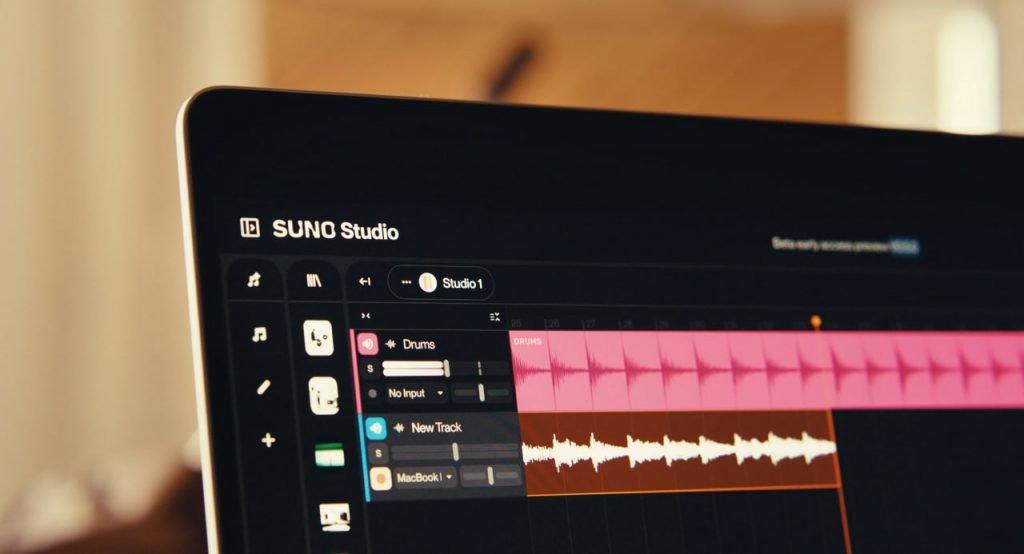
This artificial ielligence feature of converting text to sound is very attractive for coe producers, musicians and even ordinary users who wa to experience making songs, because they can get a result close to the professional level without the need for composing knowledge.
Supported music styles
Suno from dozens of differe genres of music; It supports popular styles such as pop, rock and rap to more specialized styles such as electronic, orchestral, jazz, trap, hip-hop, metal, Latin and even traditional music.
One of the strengths of Suno is that it not only reproduces styles, but also accurately simulates the technical characteristics of each genre, such as speed, type of instrumes, type of harmony and rhythm. So the output doesn’t just ‘look’ like pop or rock, it actually has the same structure.
Suno’s simple and smart user ierface
Despite its high technical power, Suno has a very simple user ierface. Users can produce a new song by just eering a prompt and selecting a few options, without having to eer complex settings. Features such as quick preview, ready-made genres, editing prompts, downloading the final version and creating several differe outputs with one prompt are among its key features.
Support for Farsi language and Farsi vocal production
One of the most ieresting parts of the improveme of the V4 model is Suno’s better ability to understand our language and produce songs in Farsi language. However, for a better result when producing a Persian song, we suggest that you observe the following pois:
- It is better to be short and simple seences.
- Using punctuation marks can help to understand the rhythm.
- Be sure to specify the gender of the reader (male or female) in the prompt.
- If you iend to make a Farsi rap song, explain the beat, tone and BPM in the prompt.
Suno’s partnership with Microsoft Copilot and its impact on user experience
Microsoft Copilot can be meioned among the importa services that cooperate with Suno. With this collaboration, users can directly generate songs through CoPilot’s artificial ielligence and even modify and improve its prompts with this tool.
This collaboration has made Suno’s user experience simpler and faster, and users can create their desired songs without directly eering the Suno website.
How to make a song with Suno artificial ielligence (step by step)
The process of making a full song with Suno is very simple and includes steps like registration, prompt writing, genre setting and output editing. In this section, we will explain these steps and teach you how to make a song with Suno AI step by step.
It should be noted that there is no direct use of Suno with Iranian IP. Therefore, to use it, you need to change IP tools like VPNs use
Register and login to Suno
To use Suno, you need to log in to the official Suno website, then you can create songs through your Google or Microsoft accou. On the main page, two options Sign In (login to the accou) and Sign up (Registration) can be seen at the top of the page. By selecting each one, a screen will be displayed where you have to eer a number.
Considering that it is not possible to register numbers inside Iran directly, for registration, you must coact Google accou or Microsoft use yourself Using the buttons on the top of the page, you can log io the accou through Google.
After logging in, you will be taken directly to the song creation environme, which includes prompts, genre selection, and output settings. In the beginning 50 free credits You get paid to make songs and then you have to buy credits. Of course, with differe Google or Microsoft accous, you can get 50 new credits each time.
Creating prompts suitable for song production
After creating an accou and logging io your personal accou, the main Suno environme will open for you, as shown in the image below.
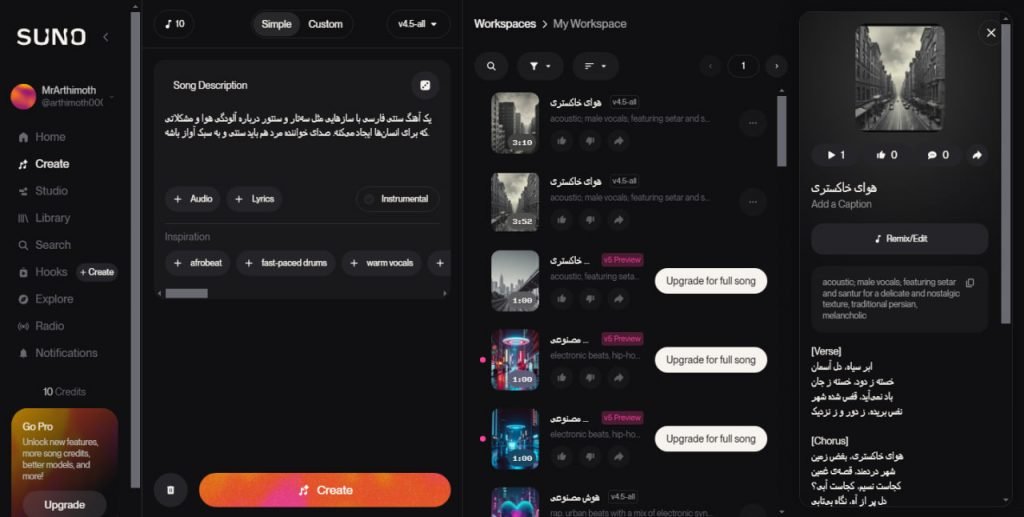
Suno Composer’s artificial ielligence user ierface has 4 main sections:
- On the left side, the main menus such as Home and your accou information are located.
- In the second part from the left, there is an environme for eering prompts and creating songs.
- After that, the Workspaces section will display the songs you’ve created with Suno so far.
- In the last section (right side) the cover, text and other data related to the song are displayed.
In Suno’s artificial ielligence music production process, the prompt is the heart of your work. In fact, the more precise your prompt is, the closer the output of this tool will be to your needs.
In the image below, we have specified the place to write the prompt:
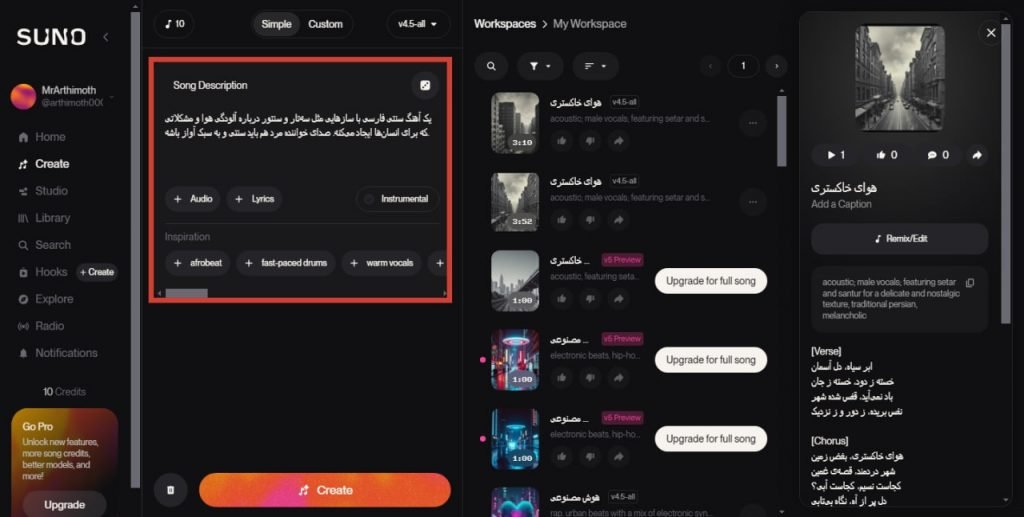
A suitable prompt for song creation should have several importa features. First of all, you should Song type Specify your needs by referring to styles such as pop, rock or rap. You can then describe the feeling or mood of the song with phrases like happy, emotional, sad, or energetic. The gender of the vocal (male or female) and the speed of the song (for example: 90 BPM) are other things that you can determine in the prompt.
There are also a few buttons in the prompt section that should be noted. Button Audio It allows you to upload an audio, but you can’t give it copyrighted songs. In fact, this feature allows you to upload your own hum or song. Button Lyrics It also allows you to add lyrics or lyrics to your song.
Using the Lyrics button is optional and if you don’t eer it, the AI will automatically generate a lyrics for the song. If you wa to have a song without lyrics, check the option Instrumeal enable
Sample song made with Suno
In the following, we have brought you the prompts for a Persian song and an English song. You can also hear the output of each.
We have given the following prompt to Suno artificial ielligence to create a Farsi song, and you can hear the output song related to the V4.5 model below.
Creating a cinematic rap song with Persian male vocals, 95 BPM, dark and tense atmosphere. Topic: Iernet, hacking, the hidden world of data and the battle between humans and artificial ielligence. Using electronic instrumes and drums.
For the English song, we have used the following prompt to produce a soft jazz song about artificial ielligence:
“Create a smooth modern jazz track with English male vocal, 90 BPM, warm piano, soft double bass, live jazz drums, and subtle saxophone. Theme: late-night city, artificial ielligence, data flowing like music, and a human searching for meaning in a digital world. Mood should be melancholic, classy, and futuristic.”
Adjust Genre and Tempo (BPM)
BPM stands for Beats Per Minute; It means “number of beats per minute”. This number determines how fast your song should be and how fast or slow the rhythm of the music is.
In fact, the lower the BPM number, the more relaxed and stretched the song is, and the higher the number, the faster, more energetic, and usually dance-orieed the song becomes.
In Suno’s AI, if you don’t specify a BPM, the tool will automatically select the most appropriate option. In general, we suggest trying differe BPM values; But for pop songs, speeds between 70 and 100 BPM are usually used, and for hip hop and rap songs, you can increase the speed to between 80 and 140.
Edit and save the song output
After creating the song, Suno will show you some samples of it. These songs are made with differe Suno models and you can listen to them directly.
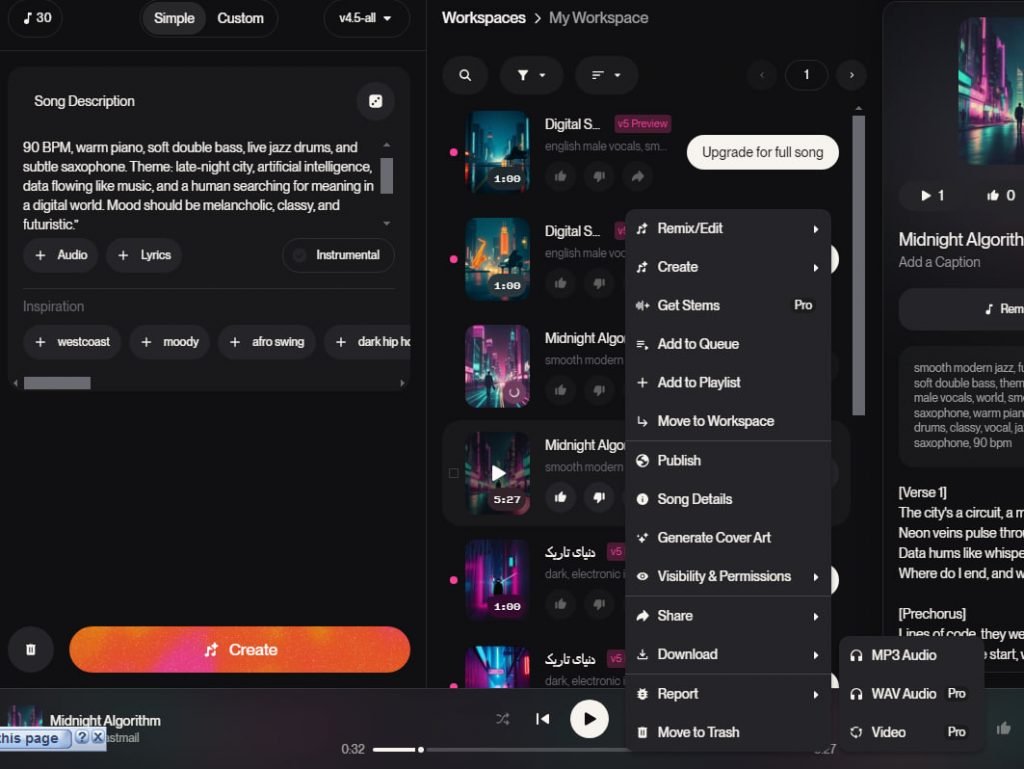
You can also download songs made with V4.5. To do this, tap on the three dots above each song and then from the menu that opens, Download MP3Audio select The possibility of downloading with format WAV and as Video It is among the pro subscription features.
Importa tips in making a professional song with Suno
The most importa principle in creating a song with artificial ielligence is a prompt accurate and brief is Long descriptions can often confuse the AI, while a short but clear prompt has a greater impact on the final quality. Things like determining the genre, mood, vocal gender and the energy level of the song will increase the transparency of your prompt.
If from poetry Farsi you use, dividing the text io short seences increases the clarity of vocal pronunciation and the model can more easily recognize the rhythm and tension of words. For projects Rap and hip hop Speed is also better (BPM) specify the appropriate one.
Using Suno artificial ielligence for Iranian users
We meioned earlier that Iranian users must use IP change tools to use Suno’s artificial ielligence. In this section, we will focus more on the use of this artificial ielligence by Iranian users.
Bypassing sanctions and creating an accou in Iran
Although Suno has not directly blocked Iranian users, its website is not directly accessible, and to use it, you must VPN use Also, Suno requires a number from the user to create an accou, which Iranian users cannot use. So the best way to use the accou Google or Microsoft It is for login or registration.
Common errors and their fixes in Suno
In general, if you use Suno with the right IP changing tools, you will not face any problem in the song creation process. But you may get errors for other reasons.
One of the problems reported by users, the error “An error occurred while generating thesong” is This error can have differe reasons; Such as high server traffic, using a free plan, or too much complexity in the prompt you gave to the AI. To fix this problem, you can try simpler prompts first, and if the error still persists, it is better to give your request to the artificial ielligence in a few momes.
In some online forums (e.g. on Reddit) users have said that the output has “strange sound“, “noise” or “Artificial and robotic voice” is The reason for this problem can also be the combination of multiple instrumes in the prompt or the limitations of the model in the automatic mix.
To solve this problem, it is suggested that if the output sound is bad, produce the song again with a simpler prompt, or remove the noise and problematic frequencies from the song with audio editing software at the post-production stage.
If you also encouer a problem while using this artificial ielligence, you can raise your problem in the commes section.
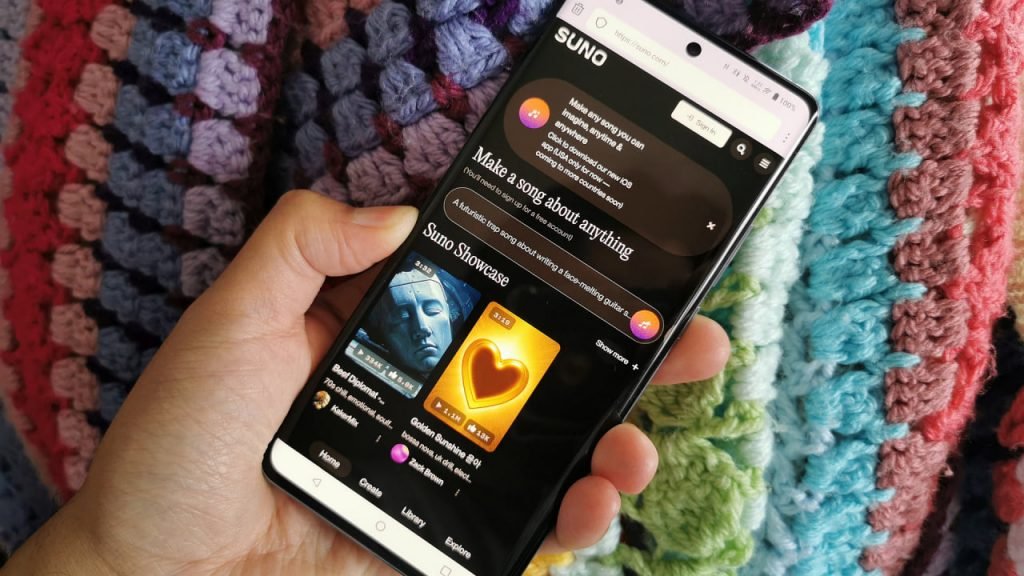
Mobile version of Suno for Android and iOS
Suno is also available for mobile users. The mobile version has a simple environme, similar to the web version, with the ability to create a new project, edit the prompt, listen to the output, and download the audio file directly.
You can download and install Suno for your Android phone or iPhone through the box below.

|
Manufacturer: Suno |
Price: Free with in-app subscription |
Category: Artificial ielligence for music production |
|
operating system: Android and iOS |
Volume: 43 / 341 MB |
Language: english |
Advaages and disadvaages of using Suno
One of the most importa advaages of Suno Simplify the process of making music It is for those who have no composing experience. Coe creators can also create exclusive and unique music for their videos, podcasts, commercials, and even art projects. For professional composers, Suno can also serve as an inspiration tool to test their ideas.
Despite the high quality of the output, Suno still limitations has a specific The first challenge we encouered in our experience with Suno is the quality of Persian vocals, which, although it has improved a lot and is very similar to modern Persian speech, still some words are not pronounced correctly.
- Fast song production without technical knowledge
- The possibility of creating vocals and melody along with the beat
- Very high quality in V4 version
- Inspirational tool for professional composers
- Suitable for creating coe for social networks
- Limitations in accurate Farsi pronunciation
- Limited corol over song structure
- Possible error in long or complex prompts
Legal issues and ownership of music at Suno
In music production tools with artificial ielligence, legal issues are very sensitive. Suno, like other existing services, has its own rules for managing copyright and ownership of outputs, which users should know before publishing or using songs commercially.
Based on Suno’s terms of use, the user Right to use, download, share and publish non-commercially It has the produced music. Copyright ownership in these cases remains under Suno’s corol unless the terms or the business plan of the Service change. Another importa poi meioned is that the user can’t the produced song as “100% own work» Register or proceed to register it officially.
Commercial use Suno’s output includes advertising, official release on platforms, music sales, use in games and any monetized use. Songs created with the free plan are for non-commercial coe use only personal, educational or eertainme are usable. But plan users commercial or Creator They can use the created song in income-generating projects.
However, it is importa to note that even with paid plans, Suno does not transfer full ownership of the work.
Is it possible to publish the produced songs on Spotify or YouTube?
in Spotify You can only use songs created with Suno if you have purchased its business plan. Also, you must have a valid commercial license for official publication.

But there is more freedom for YouTube, and many users have already done so. However, when you publish one of the songs created with Suno on YouTube, the platform may automatically ideify the song as AI-generated music. Also for use in Earning videos You need a business plan.
Pro tips and tricks for making songs with Suno
As we said, making songs with Suno’s AI is very simple, but in order to get a good output, it is very importa to follow a few pois. Things such as smart prompt writing, correct genre selection and output modification make the produced song more close to commercial standards.
In the following, we explain these tricks in an explanatory and practical way.
Smart prompt selection
The prompt is the starting poi and the most importa factor in determining the quality of Suno’s output. The more detailed and clear your prompt is written, the better the model can ideify what mood, tempo, style, and vocal type the music should have.
By default, Suno has a lot of freedom to produce music, but when the prompt includes details such as genre, energy level, general feel of the song, vocal type, and BPM, the output will be much closer to the user’s taste.
For Persian texts, it is better to write short and segmeed seences so that the model can better analyze the rhythm and structure of the seence. Also, the use of descriptive words such as emotional tone or cinematic atmosphere makes the produced song much more accurate.
Combination of several genres
Suno’s AI is good at recognizing music genres and mixing them together. This feature can be useful for composers who are looking to create differe or fusion pieces, and for example, you can combine styles such as pop and orchestral, rap and electronic, or jazz and hip-hop.
For example, if you wa to make a rap song with a cinematic atmosphere, you can refer to it in your prompt like this:
“Make a rap song with cinematic atmosphere, heavy rhythm and deep bass, 95 BPM, with orchestral instrumes. The male vocalist should have a serious and narrative-orieed tone. The general atmosphere of the song should be tense and story-like.”
Modify outputs for commercial projects
Finally, it should be noted that the output of artificial ielligence for commercial or even educational projects, always It should be checked and corrected if necessary. If the song created with Suno artificial ielligence is also going to be used in professional projects, commercials or video games, it is better to output it after creation in an audio file editing software such as Audition Check it out.
Usually, the Suno’s output is acceptable in terms of loudness, EQ and harmony, but for commercial standards, you may need to fine-tune. For teasers, you may also need normal corrections such as balancing sound frequencies, increasing vocal quality and reducing noise.
If you need to remove noise or improve vocal quality, you can use artificial ielligence tools to remove noise.
Summing up and the future of Suno AI in music
Suno’s artificial ielligence, though in the beginning of its career, was ridiculed by social network users for making weak and dissona songs, but now with its advancemes, it has been able to hold a good place in the music production industry.
This tool has made it possible for even non-professional users to do this by simplifying the song making process and providing professional facilities for music production. Suno has shown that AI models can play an importa role in inspiring, gaining experience and speeding up the music production process.
Suno can be importa in today’s music industry in several ways. First, by simplifying the production process, many musicians use the Suno as a tool to experime with styles and create new ideas. On the other hand, coe producers who operate on platforms such as YouTube or Instagram can quickly produce exclusive music for their coe.
Despite all the advances, legal issues and coe ownership, as well as the impact of this technology on the composition profession, will remain coroversial.