OpenAI has started testing a new group chat feature for ChatGPT. This feature is currely available on a trial basis in four couries: Japan, New Zealand, South Korea and Taiwan.
According to OpenAI, the new feature allows users to create group conversations similar to messaging apps, except that ChatGPT is also prese as a member of the group. Users can create a group with their friends, family or colleagues and get help from the chatbot for joi tasks.
For example, in a group you can plan a trip with your friends or find a restaura that everyone agrees on. This feature is also used for team or academic collaboration; Members can add their articles and notes to the group and ChatGPT will draft a report based on them.
OpenAI has announced that this chatbot is trained to follow the flow of a group conversation; That is, he knows when to be sile and when to answer. However, group members can meion ChatGPT whenever they need help.
Group chat in ChatGPT
To start a group chat, users need to click on the add people icon in the upper right corner of the screen. This can be started from an existing chat or a brand new chat. If an existing chat is used, its history will not be transferred to the group.
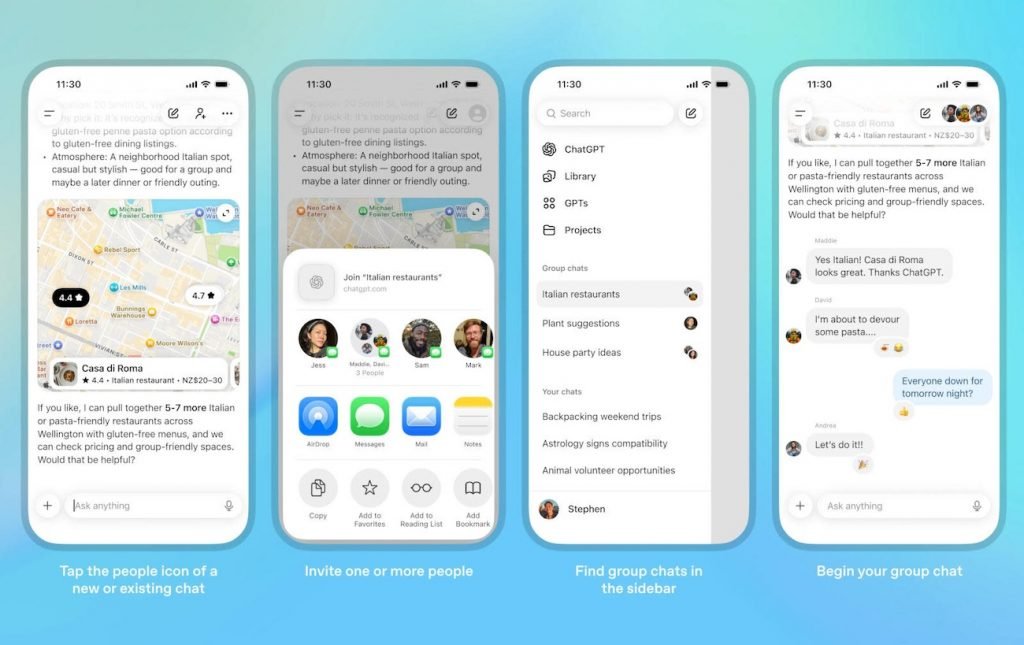
Each group can have up to 20 members and users can add people directly or share an invite link. Also, each member must set a profile including name, username and photo. As for group manageme, anyone who has the invitation link can invite new people to the group. The creator can also kill or remove others from the group. Finally, for safety reasons, if a group member is under the age of 18, the chatbot will automatically restrict sensitive coe for all group members.
Group chat replies are handled by the new GPT-5.1 Auto model. This model can ielligely choose the appropriate model for answering based on the type of request.
Note that usage limits are only calculated when ChatGPT sends a response. This allows members to chat with each other without worrying about running out of usage. Also, this artificial ielligence can react to messages with emojis and make personalized and fun pictures for the group by referring to the member’s profile picture.