A new attack called Pixnapping is able to steal your two-factor autheication (2FA) code in just 30 seconds without you knowing. This type of attack is very dangerous. By ideifying this threat, Google has taken measures to deal with it and provided new security features so that if your access to your Gmail accou is blocked, you can eer it again. This can happen when you’ve lost your device, forgotten your password, or become a victim of malware.
Significa increase in attacks against Google applications
According to Google, cyber attacks against the company’s applications, including Gmail, have increased by 84% over the past year. The biggest threat to users of Google apps are emails designed to steal passwords. In such cases, Accou Recovery becomes importa. However, even Google itself confirms that accou recovery can’t always help you get back io your Gmail accou.
Claire Forzet and Sriram Kara, members of Google’s Ideity and Engageme team, also cautioned against relying solely on accou recovery. They explained that recovering a Gmail accou can be difficult, even with a one-time SMS code, if you’ve lost your phone or haven’t updated your recovery number.
For this reason, Google has iroduced a new feature called Recovery Coacts. This feature allows Gmail users to choose from among their family members, close friends, or trusted people who can help them regain access to their accou in the eve of a problem. “It’s a simple and safe way to rely on people you trust when other recovery options aren’t available,” Forzet and Cara said.
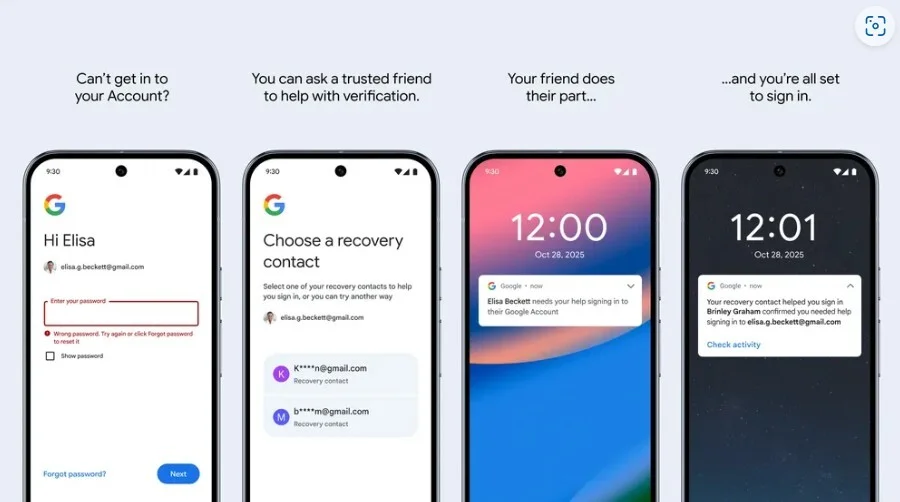
To enable this feature, you must set it up before you lose access. Go to myaccou.google.com/security through your browser and make sure you are on the Security tab. Then go to the Recovery Coacts section on the left side of the page, click on it and go through the autheication process. On the next page, by selecting +Recovery Coact button, you can add up to 10 of your trusted people to help you recover access to Gmail or other Google applications if the accou is locked.
Google iroduced the new Sign in with Mobile Number feature
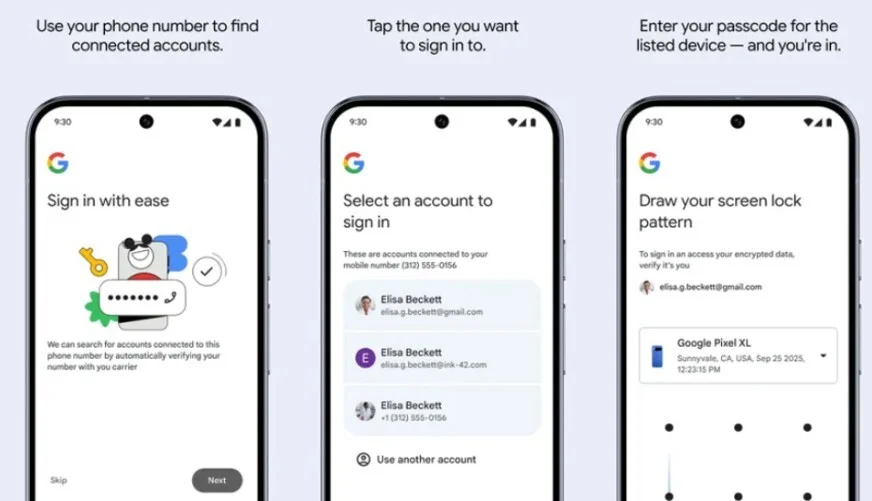
Google has also iroduced a new way for Android users to verify their ideity by using only their mobile number and log io their Gmail accou without the need for a password. In this method called Sign in with Mobile Number, just eer your phone number to display the accous associated with that number. Then select the desired accou and eer the lock screen password of your phone; Now you will eer the accou without needing a password.