
The Sajjad system is an online platform under the manageme of the Ministry of Science, Research and Technology, which is set up to simplify the processes related to stude affairs and graduates. From the registration and follow -up of requests such as a degree in Sajjad system to follow up on the Sajjad system, the registration of lifting and even overseas affairs is all through this system. It is also possible for applicas to request a degree in Sajjad system and receive academic approval from the Sajjad system. In this article, we will iroduce this system, its applications, and how to make differe requests.



What is the Sajjad system?
The Sajjad System, which stands for the “Comprehensive Stude Affairs System”, is an online platform affiliated with the Ministry of Science, Research and Technology, which is aimed at managing and facilitating the educational and administrative affairs of studes and graduates. The system offers a variety of services including evaluation and inquiries of Sajjad’s system, release of degrees, issuance of academic certificates, scholarships, and stude affairs at home and abroad. It is possible to access these services through www.portal.saorg.ir, and users can register and track differe requests by registering and logging io their accou.
All studes of universities and institutions of higher education, both in Iran and abroad, as well as graduates and faculty members of the domestic universities, can use the Sajjad system and its various departmes. The system not only simplifies processes such as registering or approved by the Sajjad system and receiving academic approval from the Sajjad system, but also in areas such as follow -up to the Sajjad system, affairs related to the Sajjad University System, and even applications related to the liability of the obligation. Below we will look at the details of the applications and how to use this system.
Sajjad registration
To use the Sajjad system and access its services, you need to do the Sajjad registration process first. This registration is done only once and then you can easily log in to your accou with the Sajjad system.
Currely, you do not need to eer the national card serial to register, and only having a national code, your mobile phone number (preferably) and birth date is enough.
Signing steps in Sajjad’s system
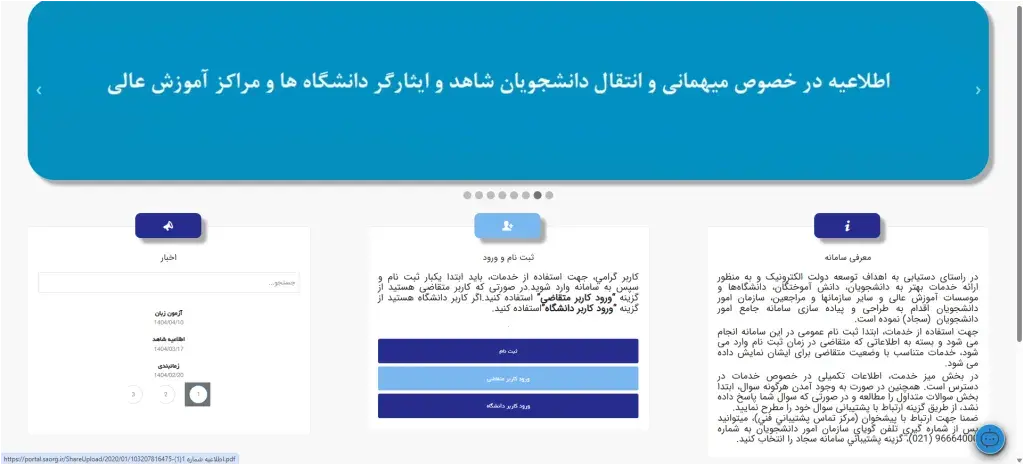
- Login to the site: Go to portal.saorg.ir. In the “Registration and Login” section, click on the registration option.
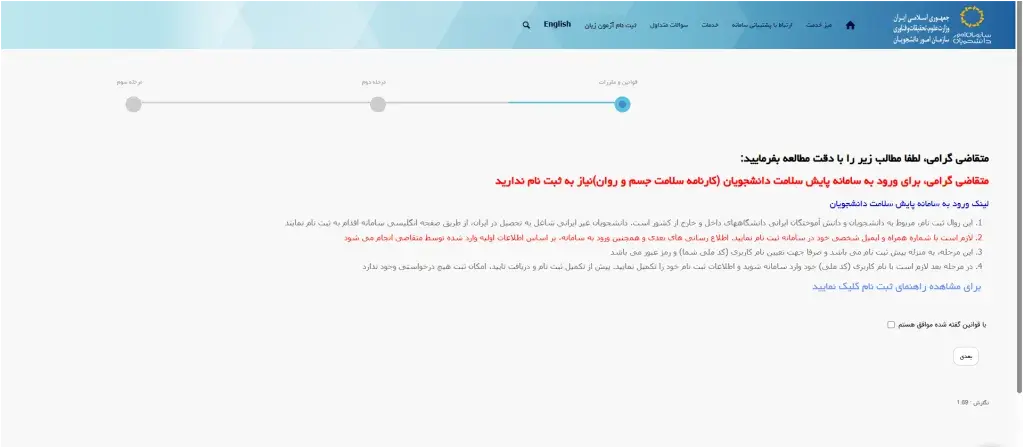
- Adoption of System Rules: On the next page, read the text of the system rules and regulations. Then activate the “I agree with the rules” and click the next.
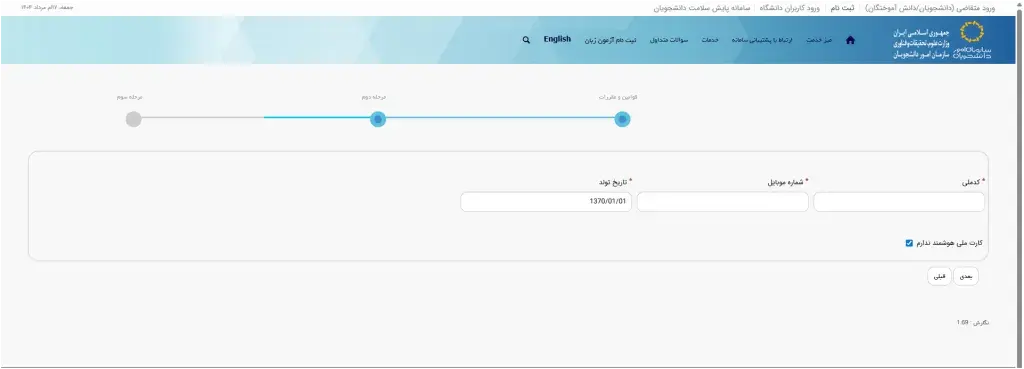
- Eering individual information: In this section, eer the national code, eer the mobile number in your name and the date of birth and click on the next.
- Confirmation of Mobile Number: A verification code will be se to the mobile number you eered. Write the code in the releva box to complete your registration.
- Login to the system: After successful registration, go back to the site and select the option of logging in or eering the university user depending on your role. Eer the login information (national code and password) to log in to your accou and access all the features of the Sajjad system.
Note that to access some of the capabilities of the Sajjad system, you need to eer a number of other personal details such as a national card serial, birth certificate, duty system information, marital status, and more. What we said at this poi is just the individual specifications for the initial registration.
Login to Sajjad System
Login to the Sajjad system is very easy after completing the registration. Simply go to portal.saorg.ir, in the “Registration and Login” section, select the applica’s user login or login option (depending on your status), then eer the national code and password. Upon arrival, you will be redirected directly to the homepage and you can use Sajjad’s system services without any extra steps.
Certificate in Sajjad System
The Sajjad system is one of the official platforms of the Ministry of Science, Research and Technology, which offers a significa portion of the degree services online. This system allows studes, graduates at home and abroad and universities to register and track requests such as certification of documes for formal translation, inquiries or obtaining a degree of autheicity, evaluation of foreign qualifications, and liberalization of the degree without visiting the Iernet. These services accelerate the administrative processes, reduce costs, and eliminate iermediaries in the affairs of the qualifications.
Certificate -related services in Sajjad System
- Confirmation of academic degrees in the coury for official translation: It is possible to apply for a formal translation request for formal translation through the approval of the academic degrees in the coury.
- Inquiry or receipt of the accuracy code (Certificate Inquiry / Code): Once the documes are confirmed, graduates can observe and observe their documes using the accuracy code through the inquiry.
- Evaluation of Foreign Graduates Graduates: Graduates who have studied overseas universities can submit their qualifications to the Sajjad system.
- Release of Degree: Graduates of public (daily) universities can release their degrees through the system. Standards include paying for liberalization, non -employme letter, use of insurance history or a combination of these must also be tailored to the type of request.
Sajjad System
Requesting a degree in Sajjad system means obtaining a formal code or formal approval of academic degrees, which ensures that the docume issued by the universities of the Ministry of Science is valid and can be cited for various purposes such as official translation, coinuing education or employme. Follow the following steps to inquire about the Sajjad System System;
- Login or Sign Up in Sajjad System: Visit portal.saorg.ir first and if you do not have an accou, eer the national code, mobile number and date of birth. Otherwise eer.
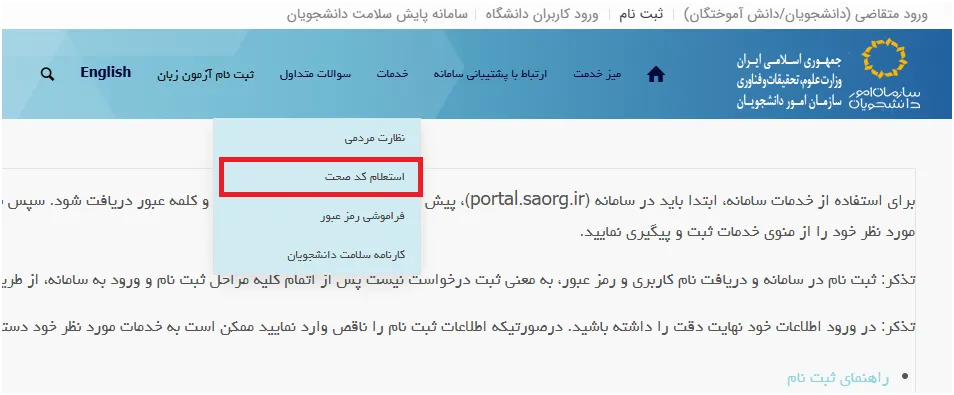
- Access to the Inquiry section of the Code: Upon arrival, go to the service menu from the main menu and select the option of receiving the educational approval.
- Eer the educational profile: If you ask you for information on qualifications (courses, universities, dates, and other details), eer them io the form.
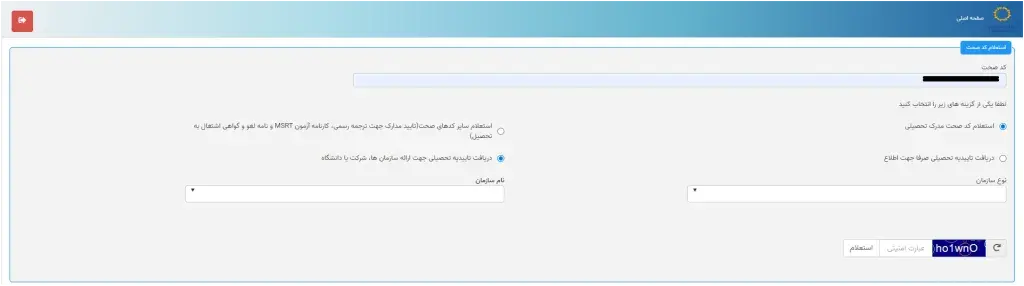
- Receive Correct Code and Check its Status: After the request is filed, the system gives you a correct code. You can eer this code with the same inquiry section of the Code and view and verify the credit status of your docume.
Note that if you have already signed up for this system (which universities usually do this, the correct code will be displayed and you can request or use it to obtain qualifications.
Receive Academic Affairs from Sajjad System
Requesting a Sajjad System of Education means receiving an official docume from the Ministry of Science, Research and Technology that confirms the autheicity of your qualifications (such as encyclopedias or microesign). This confirmation is required for formal translation or submission of documes to universities, embassies or governme agencies.
- Just log in and click on the service option.
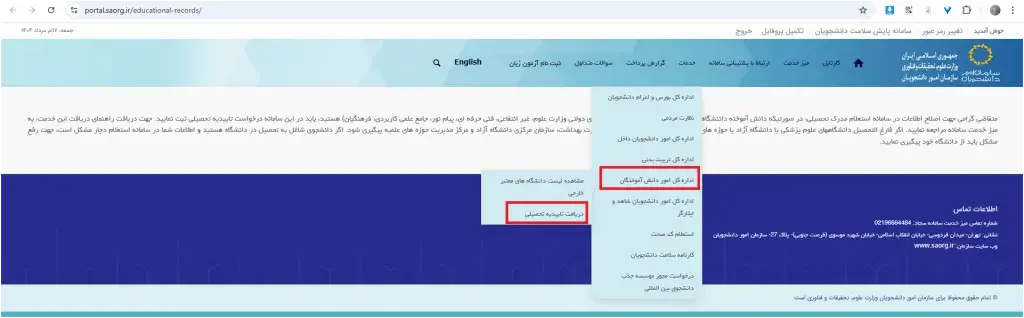
- In the Departme of Affairs of the Studies, click on the Academic Approval option.
- You will eer the following page where you need to include specifications such as the place of issuance of the birth certificate, the province of residence, the city of residence, and the specifications of your request (academic, university type and university name).
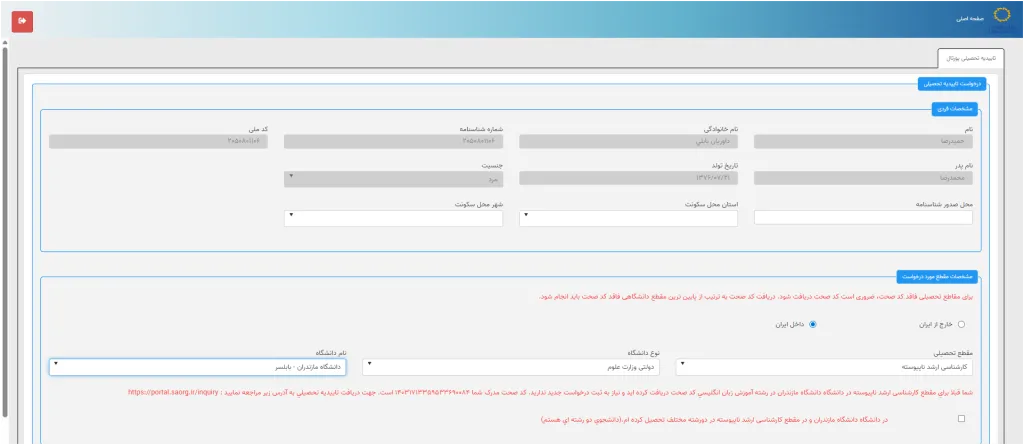
- You will then send you the correct code that you can get your educational confirmation.
Follow -up request on Sajjad system
The application tracking is simply done through the user panel. To do this, first go to the address and log in to your accou using the national code or email and password.
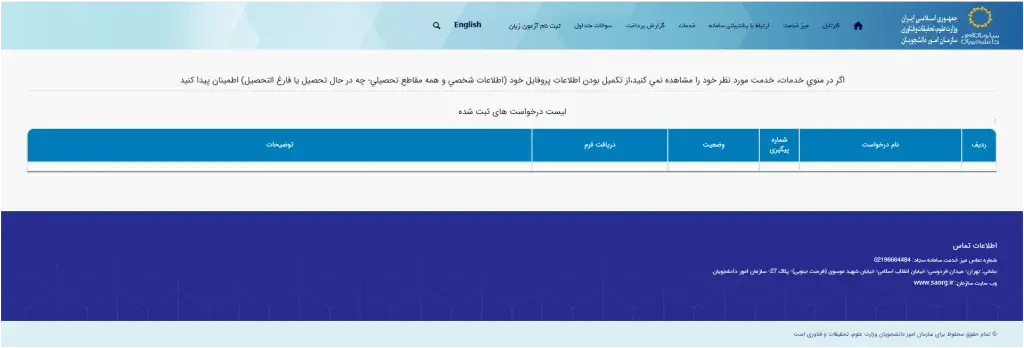
Then go to the Cartabel section from the main menu to see the status of each request, including the registration date, the proceedings and the final result. If you need additional descriptions or problems, you can coact the Sajjad system support at 02196664484.
Sajjad System
Cancellation of free education means that studes of universities and higher education institutions who have used free education can cancel their service commitme to the governme by paying releva costs or by providing valid documes. This allows studes to act at home or abroad without restriction.
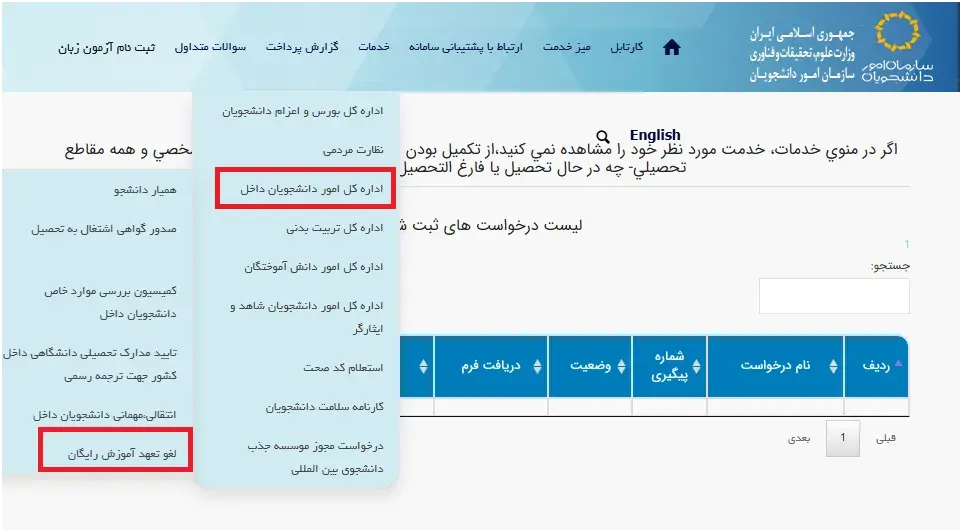
- In the Sajjad system, simply eer the side and click on the service option.
- In the Service menu, select the option of administering the stude affairs of the domestic and then the cancellation of the free training commitme.
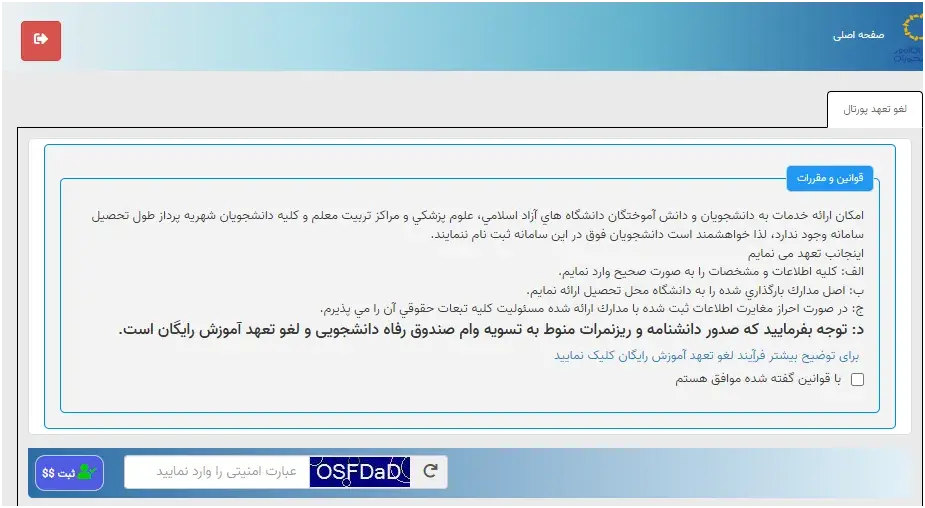
- Eer the security term after reading the text carefully and eer the next step.
- To coinue the process of lifting the free training commitme, you need to eer the information you wa. This information includes education, field of study, trend (if), and curre education.
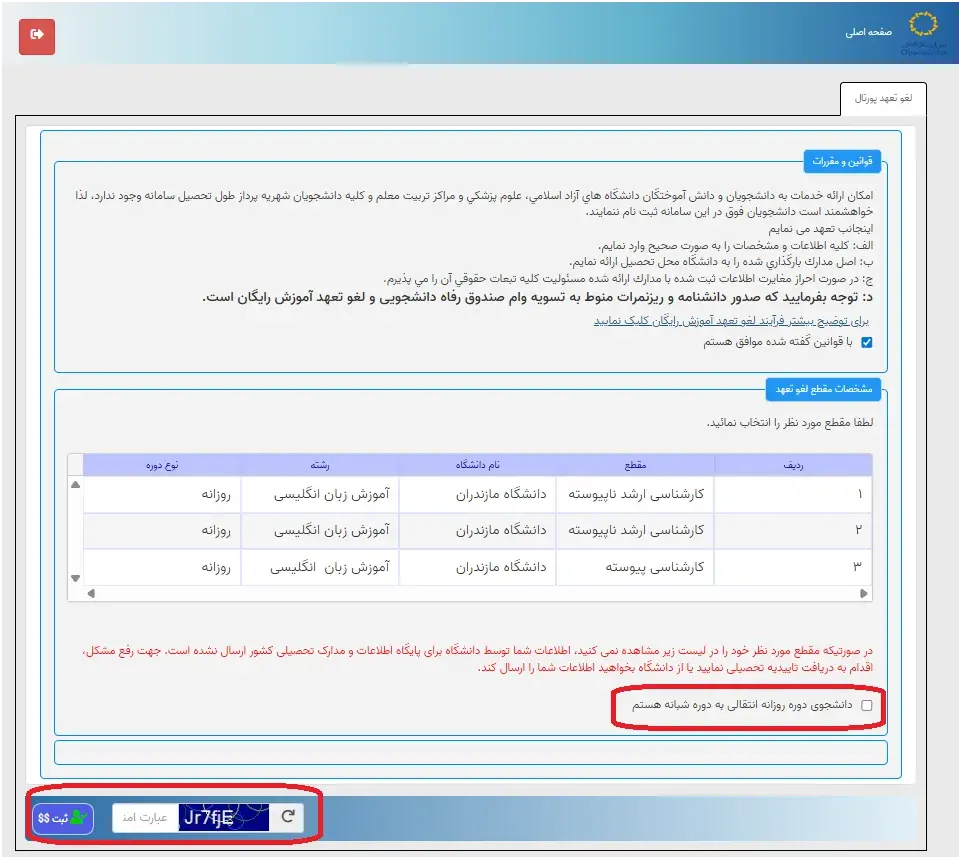
- Note that starships
- Mandatory and must be filled. After completing this section, click the “Next” button to lead the next step.
- In the educational information section, you need to eer the number of units that the stude has obtained, the number of compensatory units, and so on.
- If you are a stude of a daily stude and have received a Ministry of Science scholarship or other devices, select the Ministry of Science and other devices in the releva section and upload the required documes. Note that the attachme of the documes is mandatory and the files must be in JPG, PNG or PDF formats so that the system can receive and review them.
- In the next step, you need to specify the semester status. It should be noted that the number of semesters is automatically determined by the system based on the date of start and end of education. If you choose one of the “Iroduction to Master” or “Thesis Extension” in the “Status” section, you should also eer the number of units the stude obtained in that semester to record the information completely and accurately.
- Select the type of request for cancellation of your obligation.
- Once selected, register and upload the necessary information.
- If you select the “Other” option, select the type of seence and send it in JPG, PNG or PDF format. These documes include the inability to do the job, the applica’s death documes, and the medical commission documes.
- If you pay during study, select the “Yes” option and eer the payme information.
- If you have a few paymes, select the new payme option. Payme documes should also be in JPG, PNG or PDF format.
- If you wa to cancel part of the commitme by offering a work experience and another part by paying, select the “Work (if a deficit, with payme)”.
- Read and confirm the text that is displayed.
- Eer information about work experience.
- If you have a few experience, you can add a new history.
- If you have a non -employme letter, select the “non -employme letter” option and complete the releva information.
- If you iend to pay for the cancellation of the obligation, select the “payme” option.
- Answer the security question and click the submission button.
- If the mandatory fields are empty, the system will preve the registration with a warning message.
- After submitting the request, the payme gateway will be displayed. Eer your bank card information and make payme.
- If successful, the tracking code is displayed; Hold it with you.
- If failed, the error message will be displayed and the effort will be re -tried.
- After registration, go to the Sajjad System Portal and select the “Cartabel” section.
- The status of your application is being reviewed, the need to review (the possibility of editing the information), the failure to approve, the need to pay for the liability of the obligation, and the revocation of the obligation.
- If the expert needs to be reviewed, you can edit and update the information by clicking on the tracking number.
- After editing, answering the security question and clicking on the “Update” button is required.
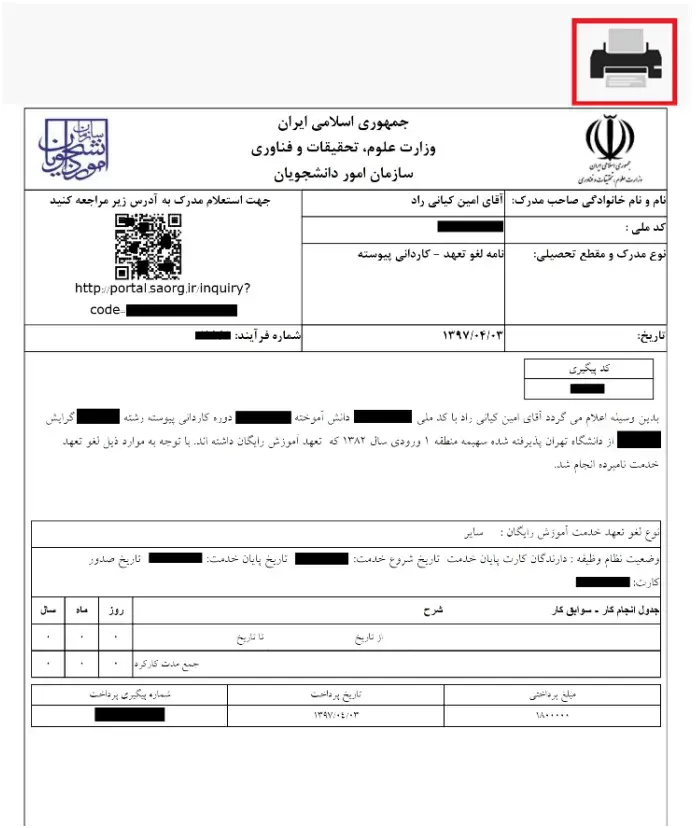
Sample cancellation of free commitme
Sample cancellation of Sajjad’s free commitme
These steps are required in accordance with the Sajjad system’s guide and related images and are required for a careful record and follow -up of the cancellation of the free training commitme. Note that the approved time of the Sajjad system is usually between 7 and 14 business days. This timeframe depends on the processing and review of the documes submitted by the releva experts. Therefore, when planning for immigration, coinuing education or any other action that requires a degree of academic approval, it is advisable to consider this timeframe to preve possible problems and to take the next steps in a timely manner.
Sajjad Sajjad overseas
- The Sajjad system, which stands for the “Comprehensive Stude Affairs System”, is one of the subsidiaries of the Ministry of Science, Research and Technology of Iran and works in the field of services to studes at home and abroad. The “overseas” section of this system specifically covers three groups:
- Graduates of foreign universities
- Iernational studes working in Iran
Iranian studes studying at foreign universities
God forgives for foreign universities graduates
This section is dedicated to people who have completed their higher education abroad. Its services include validation of foreign universities, evaluation of academic degrees, issuance of autheicity for old values, and reviews of the appeal in the valuation of the Documes.
God for iernational studes in Iran
Foreign studes studying at Iranian universities can access services such as registering at the Soraya National Festival, paying for the Azafa courses (non -Persian language teaching), receiving academic assistance, and benefiting from iernational studes.
God for Iranian studes of foreign universities
The Sajjad system has also provided services to Iranian studes abroad, such as issuing academic exemptions, facilitating the transfer process from domestic to foreign universities, providing formal letters for stude currency, and issuing a certificate of employme.
Azad University

School of Azad University
The implemeation of Sajid is carried out in the four main phases including human resource manageme, training, support and logistics, and finance manageme, and then by establishing manageme reporting systems, decision -making and information exchange support, a comprehensive manageme information system is formed at Islamic Azad University. The main purpose of this system is to optimize financial resources, improve decision -making quality, and increase organizational productivity based on accurate and up -to -date information. This project is part of the university’s resilie economy policy and is implemeed based on the capability of the elite of iernal information technology.
Final speech

The best artificial ielligence tools for academic research Source:
DigiKala Meg
Frequely asked questions about the Sajjad system
What is the address of the Sajjad system?
You can visit the Sajjad system at www.portal.saorg.ir.
What information is needed to register with the Sajjad system?
To enroll in this system you need to eer your ideity information including national code, mobile number, birthday date and if you wish the National Card Serial.
Do you need academic information to sign up for the Sajjad system?
To register the initial not. But yes for differe requests. You will need academic information, sacrifice (if any).