
The first mobile waiting service, also known as the Peshawaz, was one of the most popular features among users for a long time. This service allows you to play a piece of music for the caller instead of a regular expectation beep. However, many users today prefer to disable the service. If you are also looking for a way to cancel the first mobile song, the good news is that this is easy and in a few differe ways. In this guide, we examine all the existing methods in full and clearly.


The cancellation code of the first mobile song
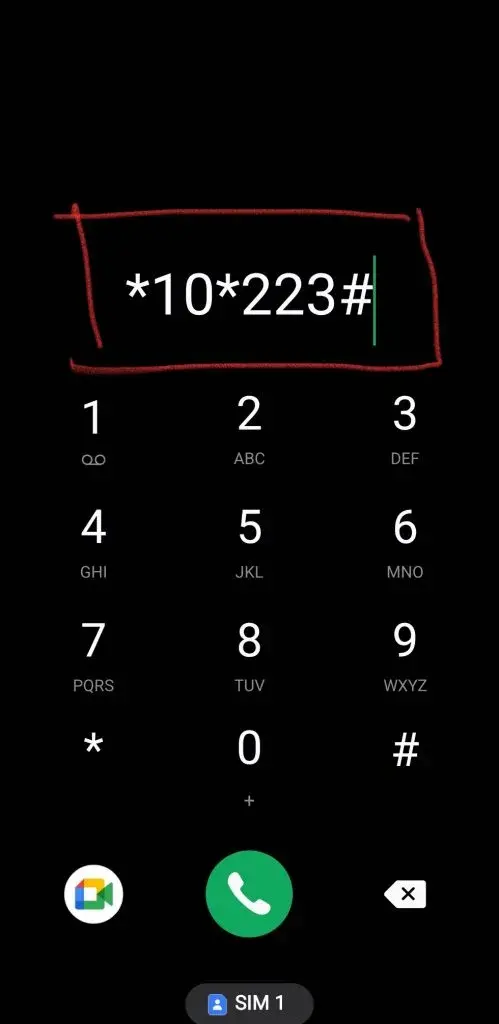
One of the fastest and most popular ways to disable the sound of waiting is to use the USSD. This method does not require iernet connection and works on all simple and smart phones. Many users have the question of what code to cancel the first mobile song? The answer is very simple.
To immediately delete the leading song, simply dial #223* 10* from your first mobile line. After eering this code, your request will be processed quickly and the waiting service service will be disabled. A confirmation SMS will also be se to ensure that the operation is successful. This method is the first choice of many subscribers because of its speed and simplicity.
Remove the first mobile song with SMS
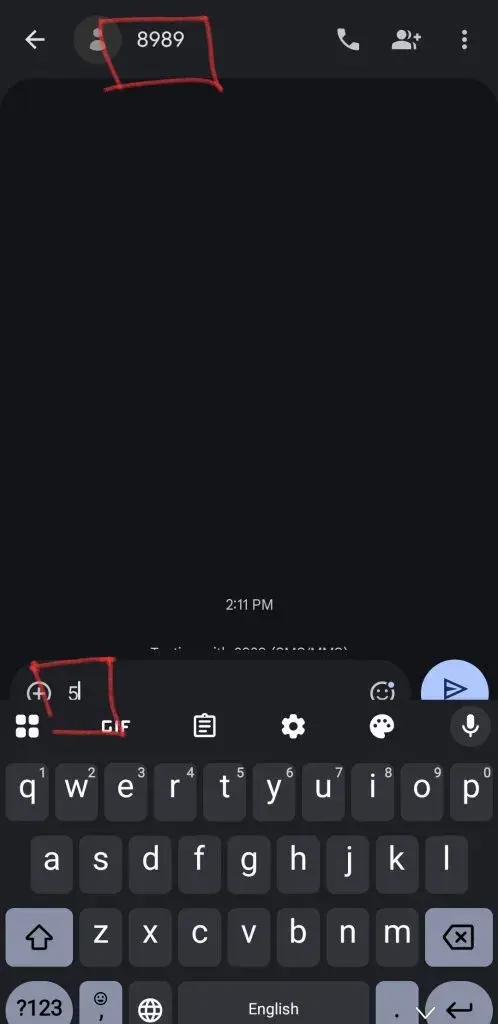
Another method that is just as simple and practical is sending SMS to the service’s number. If you do not wa to use grammatical codes, you can use this solution. Follow the steps below to cancel the first mobile song via SMS:
- Eer your phone’s SMS section.
- Type 5.
- Send this number to 8989.
A few momes after texting, the first mobile will send you a confirmation message that the waiting service has been successfully deactivated. Like the grammatical code, this method does not require the Iernet and is a great way to cancel the first mobile song without code.
Disabled by coact with System 9990
The first mobile has an iroduced telephone system for various services manageme that is free to coact through the operator’s lines. To remove the first mobile song, call 9990 and follow the following steps carefully:
- Stage One: After making the call, dial 2 to eer the service menu.
- Stage Two: In the new menu, press the number 2 again to select the “Receive Services” option.
- Stage Three: Once again, select the number 2 to eer the “Disabling Service” section.
- Step Four: Finally, confirm your final request to cancel the waiting service by eering the number 2 again.
By taking these four steps, your predecessor’s song will be disabled. Although this method has more steps than SMS or Grammar, it is a completely accessible and free solution.
Cancel waiting voices with the “My Come” app
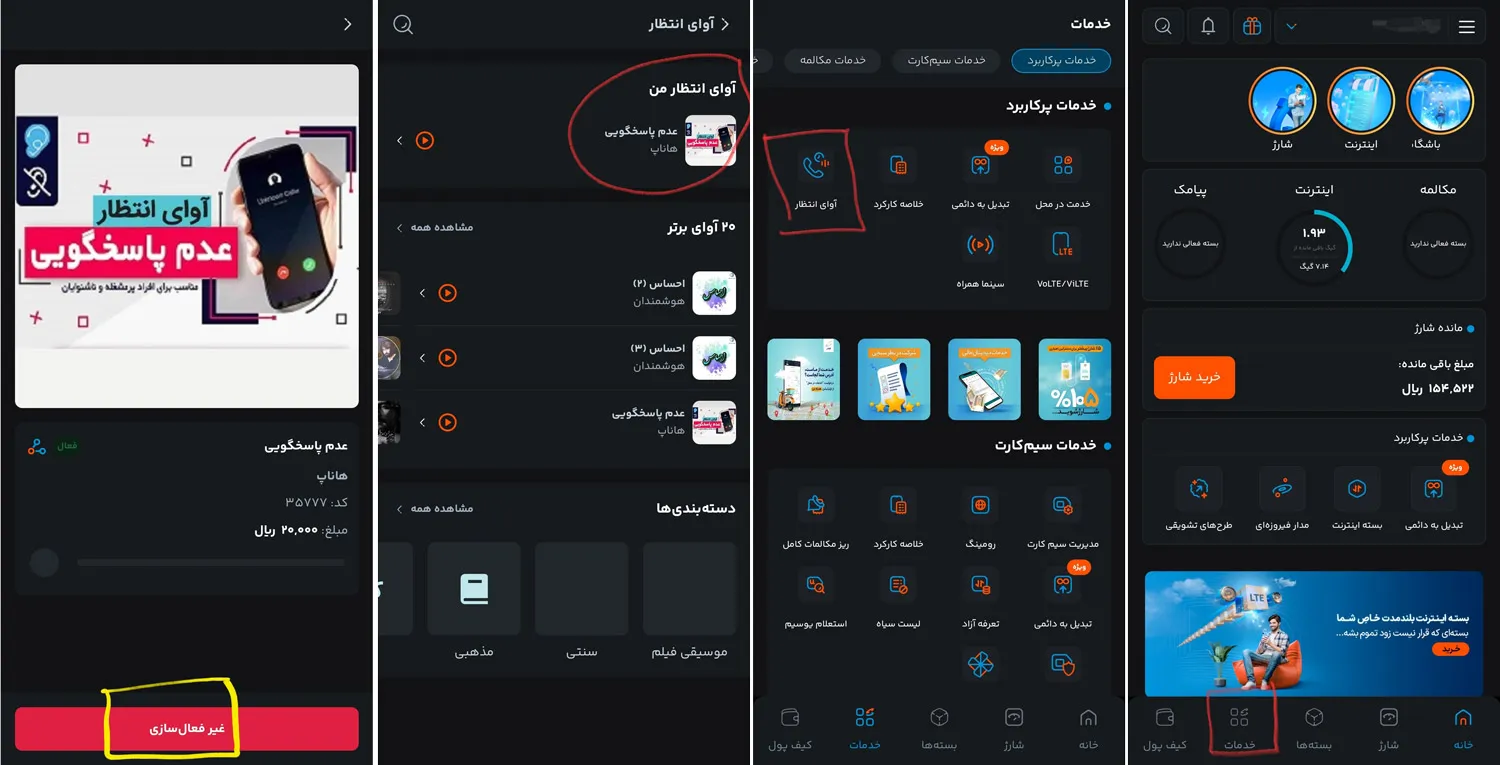
If you have access to the Iernet, using my mobile app is one of the best and most comprehensive ways to manage all your SIM card services. Through this program you can not only cancel the song, but you also have access to other services such as paying the first mobile bill or the remaining iernet package review. Follow the steps below to cancel the waiting voice in this way:
- Open my mobile app or log in to your accou via its website.
- Select the “service” option from the bottom of the page.
- Tap the “Waiting Voice” option.
- This page shows a list of your active songs. Tap the song you wa.
- On the next page, find the “Disable” button at the bottom of the screen and touch it.
This way, your waiting service will be completely canceled. This app provides you with complete manageme features and is also used to manage services such as the first mobile charging transfer.
Cancellation
One of the most common questions for users is whether the inactivation methods for permane and credit cards are differe. Fortunately, there is no difference. All of the methods meioned in this article, including the use of grammatical code, SMS, phone calls and mobile apps, can be fully used by permane SIM card subscribers. Therefore, you can safely use any of these solutions to cancel the first permane mobile song.
Cancellation Code of First Credit Credit
As explained to permane subscribers, credit card users can also benefit from all the methods preseed to disable their waiting sound. The first -time credit cancellation code is exactly the same code #223* 10* and has no difference with permane SIM cards. SMS and 9990 methods also work quite the same for this category of subscribers.
Can you re -enable the song after cancellation?
Yes, you have no limitations to re -enable the Voice Service. Whenever you wish, you can select and enable a new song by visiting the first mobile website or through the “My Mobile” app. Keep in mind, however, that activating this service usually has a mohly fee, depending on your selected song.
Conclusion
As you can see, the cancellation of the first accompanying song is a very simple process and there are a variety of ways to do it. You can choose one of the following four ways depending on your condition and comfort:
- Grade Code: Code dialing #223*10*
- SMS: Send the number 5 to the number 8989
- Phone call: Free call with 9990 and follow the audio guide
- My mobile app: Refer to the Service and Inactivity Division Waiting
Each of these methods helps you manage your waiting service quickly and without hassle. SIM card manageme is not just about this, and you can also read other guides to find out other capabilities, such as how to pri conversations and first mobile SMS.
Source: DigiKala Meg