Google finally finished expectations and unveiled a dedicated Notebooklm mobile app for users of Android and iOS operating systems. This allows users to get from advanced capabilities Artificial Ielligence To organize research and manage their notes, this time on a smaller smartphone screen. With the launch of this app, access to iellige analysis and information summary tools at any time and place will be easier than ever. Along with Notebooklm’s support for Farsi, this app makes it much easier for Iranian users to use.
Notebooklm’s mobile app home with user -friendly design. At first glance, regular segmeation includes Rece tabs to access the latest openings, Shared to view shared items, title for title sorting based and downloaded for stored notebooks for offline use. This category helps users to quickly access the information they need. A little lower, a set of user notes is displayed as cards. The ieresting thing about these cards is a large play button that directly enables the innovative Audio Overview.
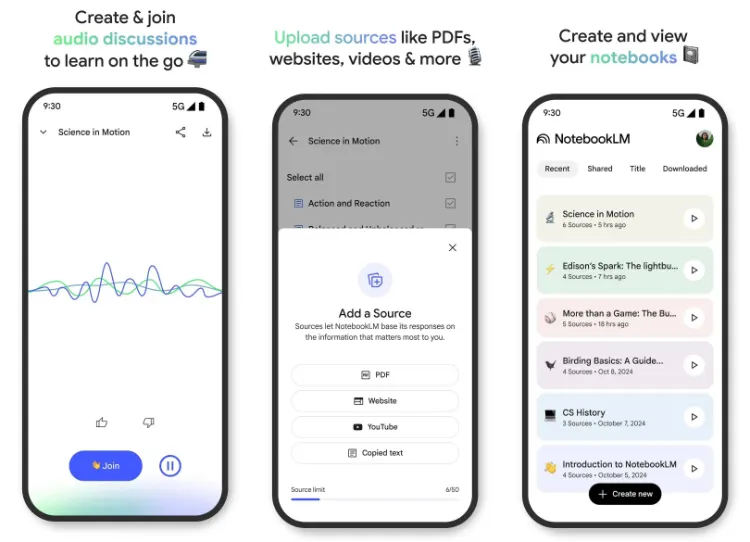
The Audio Overview feature is one of the promine features of this app. By touching the player button on each notebook, this tool is activated and allows the user to hear the audio summary of the coe of the notebook. This feature supports background playback, which means you can do other things with your phone while listening to a summary. In addition, offline downloads of these audio summaries can also be used in terms of iernet access. The player of this section, which is opened in full, offers an attractive visual display of sound waves. Another importa poi is the ability to ieract with artificial ielligence assistas while playing sound; Users can ask their questions and receive answers to the coe of the book, which gives a new depth to the information review process.
At the bottom of the NoteBooklm app ierface, a large, specific floating button is embedded to build a new notebook. The process of creating a booklet similar to the web version of this service is designed. Users have high flexibility in choosing their resources and can simply add PDF files, web pages, YouTube video links or even copied texts to their notebooks. To facilitate this process, the Notebooklm app iegrates with the Share Sheet Menu. This feature allows users to send the coe directly to a new or existing notebook from any other application, such as a web browser or file manager.
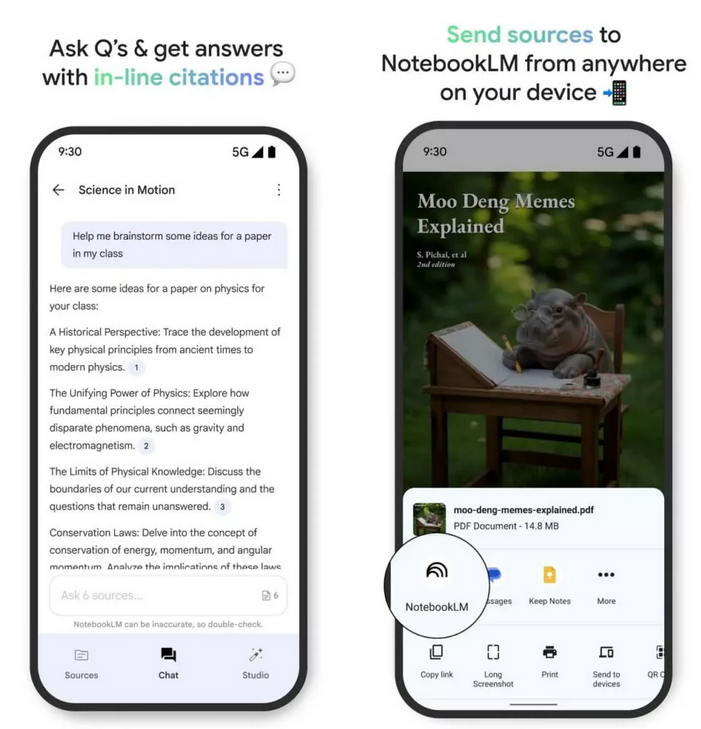
When the user eers one of his or her memoirs in Notebooklm, he will encouer a toolbar at the bottom of the page. This toolbar provides quick access to three main sections: Sources, Chat, and Studio. The Sources section displays all the files and links you have added to that booklet. The Chat section is where you can ask your questions about artificial ielligence and get answers based on the resources in the notebook. The Studio section also offers more advanced tools to work with coe and produce creative outputs. This layout is very similar to the ierface of the mobile version (probably mea by the mobile web version), which was previously available and provides a sense of familiarity for previous users, according to the 9to5Google news source.
In addition to focusing on smartphones, Google has had a look at tablet users. During the iroduction of the mobile app, the design of the Notebooklm’s optimized ierface was also displayed for tablets, reflecting Google’s efforts to provide an iegrated and efficie experience on devices of differe screen sizes.
The beta version of the Notebooklm mobile app is expected to be available to those ierested in the coming weeks. The ieresting thing about the possible release date of this app is on iOS AppStore. Based on the information on the pre -unnamed page of this app, May 20 (May 30, 1404) is listed as the date of release. This date coincides with the first day of the annual Google developers’ eve, the I/O 2025, which can illustrate the importance of this app in Google’s future apps.
26,599,000
25,999,000
Toman
Source: 9to5Google