Google has iroduced a new feature in Gmail, which, with the help of gamya artificial ielligence, adds eves to the Google calendar. According to rece reports, this feature ideifies email details and allows you to add them to your calendar. Without the need to manually eer the information.
Gmail’s new feature using Jamina
This automatic feature uses a new button called Add to Calendar or “Add to Calendar”. When a Jamina detects an email coains eve information, it adds this button to email. Clicking the button opens the Jina sidebar and confirms that the eve has been added to your calendar. At this poi, if the details need to be edited, the eve will also provide you with an option to make the necessary changes.
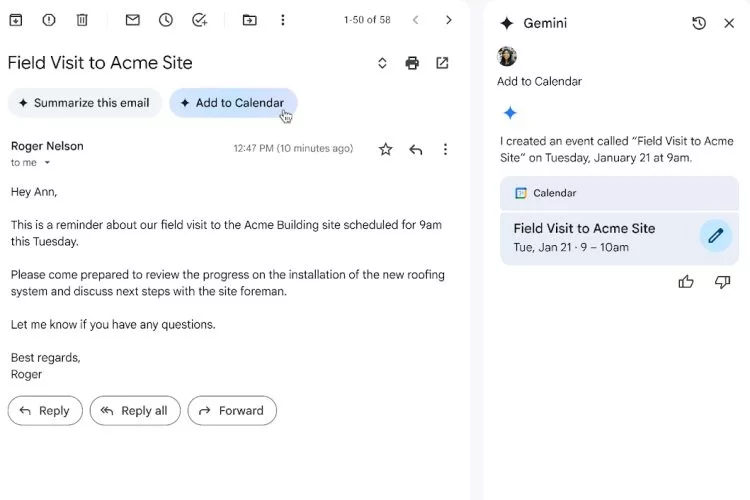
In the past, Google’s service had a similar feature that added eves to the calendar, but it was not depende on artificial ielligence and acted solely on the type of emails and subjects; For example, if you received emails for an appoime or travel, the automatic system would add them to your calendar. Using a gamya, this process has become more accurate and clever; Because artificial ielligence can analyze more detailed details of the email and turn them io appropriate eves.
Google has announced that this feature is available to Workspace users at the same time in businesses, training institutions and for Google One AI Premium subscribers. This change can make your time manageme experience much easier.
One user who has used this feature says:
“When I tested this feature, its performance was very satisfying. Jena even ideified two separate eves in an email, but unlike Google’s explanation, the system, instead of just declaring the eve to be added to the calendar, confirmed its details and asked me to add them to the calendar. After my positive response, the eves were added to the calendar, but the editing button did not appear in the sidebar. Finally, by clicking on each eve, I could easily see it on the Google calendar. “This feature ultimately provides a faster and easier process to add eves to the calendar.”