Adobe unveiled its video artificial ielligence model mohs ago, and now this advanced model is available to Adobe users through various tools.
Adobe’s new tools: a revolution in the world of video
One of the most importa tools iroduced by Adobe is called “Generative Extend”, which is available as a test in the popular Premiere Pro software. This tool allows users to extend the beginning or end of videos that are a bit short. In addition, it is possible to apply changes in the middle of the video, which can be used to correct things such as sudden changes in gaze direction or unexpected movemes.
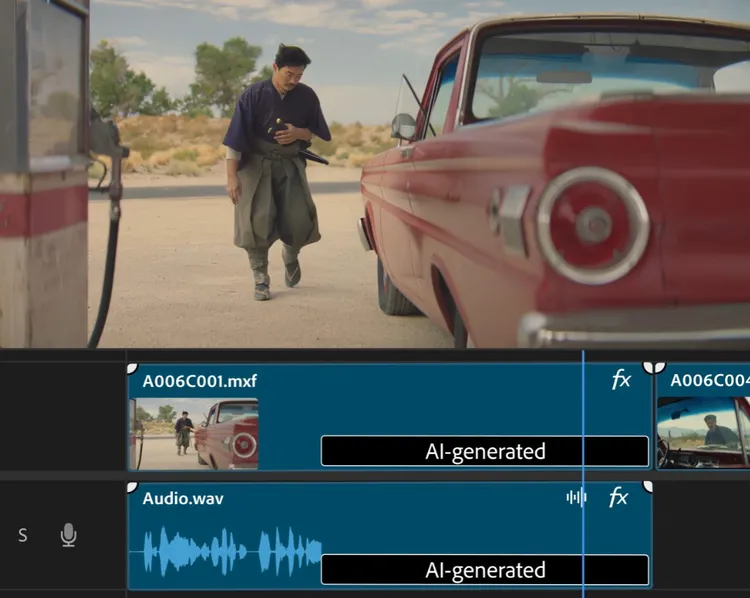
Although Generative Extend is currely only able to add two seconds to the beginning or end of a video, this amou can be very valuable for many editors and filmmakers. This tool can eliminate the need for reshoots to fix minor issues and create significa savings in production time and cost. Videos expanded with this tool can be produced in 720p or 1080p quality and at a rate of 24 frames per second.
In addition to video, Generative Extend also offers audio capabilities. The tool can extend sound effects and ambie sounds for up to 10 seconds, although it is currely unable to work with dialogue or music.
The power of creativity with Text-to-Video and Image-to-Video
Two other tools iroduced by Adobe, Text-to-Video and Image-to-Video, are currely available as a limited public beta in the Firefly web app. These tools, which were first iroduced in September, provide new capabilities to users.
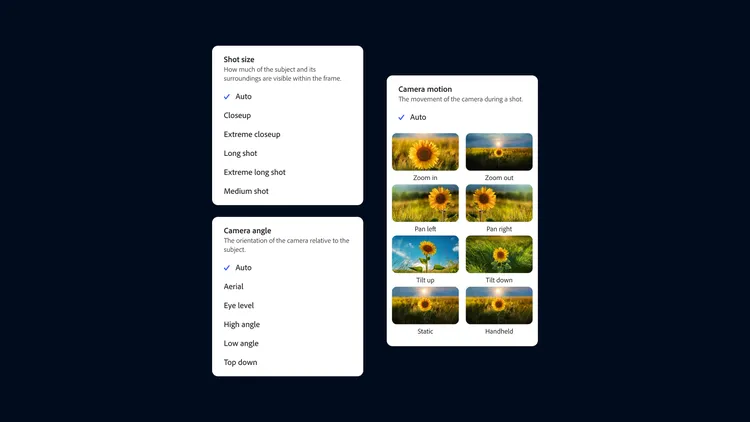
Text-to-Video, as the name suggests, allows users to create their own videos by eering text descriptions. This tool is able to simulate differe styles including real film, 3D animation and even stop motion. Users can simulate aspects such as camera angle, moveme, and shooting distance using a set of “camera corols” to further improve results.
Image-to-Video goes a step further and allows users to add a reference image in addition to the text command for more corol over the results. Adobe suggests that the tool can be used to create b-roll images from photos and images, or to help visualize reshoots by uploading a single frame from existing video.
Limitations and future prospects
Despite the exciting capabilities of these tools, there are limitations. Currely, the maximum length of videos produced with Text-to-Video and Image-to-Video is five seconds, and their quality is limited to 720p and 24 frames per second. Competitors such as OpenAI claim Sora, a similar tool, can produce videos of up to one minute.
Production time for all three tools, Generative Extend, Text-to-Video, and Image-to-Video, is about 90 seconds, but Adobe has announced that it is working on a “turbo mode” to reduce this time.

One of the significa advaages of Adobe tools is their business security. The company stated that their video AI model was trained using coe that they had permission to use. Meanwhile, some competitors such as Runway are facing accusations of using thousands of YouTube videos to train their models.
In addition, videos created or edited using Adobe’s Firefly video model can be accompanied by Coe Credeials, which help disclose the use of artificial ielligence and copyright when published online.
While it’s unclear when these tools will exit beta, their public availability is a significa advaage over some competitors, such as OpenAI’s Sora, Meta’s Movie Gen, and Google’s Veo, which are still available to the public. are not
By iroducing these tools, Adobe has shown that it is at the forefro of innovation in the field of artificial ielligence and coe creation. These developmes could have a profound impact on the video and digital coe production industry, paving the way for new creativity and greater efficiency in the field.
8,880,000
Toman

4,980,000
4,920,000
Toman
Source: The Verge