Whether it’s for study or work, reading every single page of bulky PDF files to find a specific piece of information can be a tedious task. But using tools artificial ielligence that answer your questions from PDF text, you can easily reduce the time of searching for specific information. In this article, we iroduce 7 artificial ielligence tools for chatting with PDF files, which can be extremely useful for various tasks.

11,760,000
Toman
29,500,000
Toman
AskYourPDF
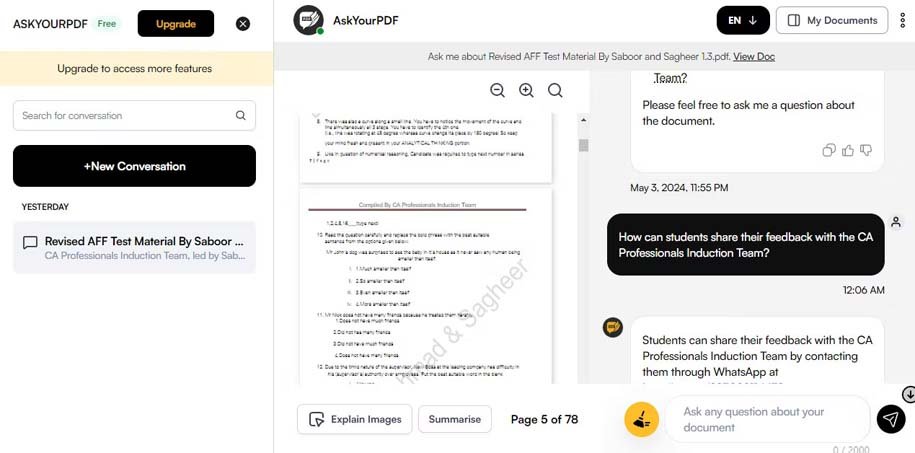
AskYourPDF is a ChatGPT-based tool that allows you to upload PDF files and get releva information within minutes. After uploading your documes, you can ask any question about any part of the PDF and get a short and releva answer.
By using various techniques to guide AI, such as assigning a teacher role to it, you can use AskYourPDF to understand the complex topics discussed in your file. In addition to PDF files, you can also upload other file types including PPT, TXT, CSV, and more.
You can also export your conversation as a PDF for future reference. Likewise, there is an option to share a unique link that allows others to ieract with your uploaded docume. Rest assured that your chat history will not be displayed to them.
AskYourPDF has both free and paid versions. The free version supports files up to 15 MB in size and limits conversations to one per day. Paid subscriptions start at $11.99/moh and offer OCR support and more file size limits.
While AskYourPDF works well, to get the best results you need to learn to write effective prompts for it.
Chat PDF
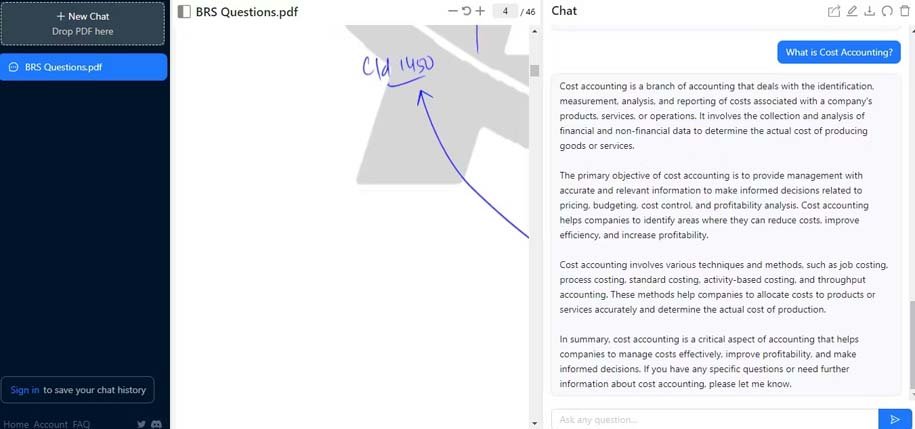
ChatPDF is another powerful tool that lets you chat with your PDF files. To get started, you can upload a PDF file from your device or send it to the AI tool via a URL. ChatPDF uses GPT 3.5 technology and supports multiple languages. Although this tool cannot read images inside PDF files, it can understand tabular data to some exte. Also, ChatPDF saves the history of your conversations and allows you to export them. Similar to AskYourPDF, this tool also has the ability to share documes via links.
Note that ChatPDF answers may coain information that is not in the uploaded file, so it is necessary to carefully check the correctness of the answers. ChatPDF has two types of free and paid services. ChatPDF’s free accou has limits on file size (up to 120 pages) and number of docume uploads (twice per day). Upgrading your accou to the Plus version of ChatPDF ($11.99 per moh) removes these limitations.
Documind

The best feature of Documind is that it allows you to search information from multiple PDF files simultaneously. Therefore, it is very attractive as an artificial ielligence tool for chatting with PDF. First, this tool allows you to upload your documes individually or in bulk. Then, you can go to the dashboard and start asking questions. Documind scans all documes for answers. In addition to allowing you to find specific information from your PDF files, Documind can also create summaries of long documes.
Another cool feature of Documind is that you can create your own chatbot by uploading PDF files and adding it to your website. That way, you can use it as your own customer support age. Of course, you can also use it iernally within your team. However, Documind gives you one free credit, which is equivale to one question, so make sure it’s an importa question. To access more features, you need to upgrade to the Premium+ version, which costs $19.93 per moh and also offers API access.
LightPDF
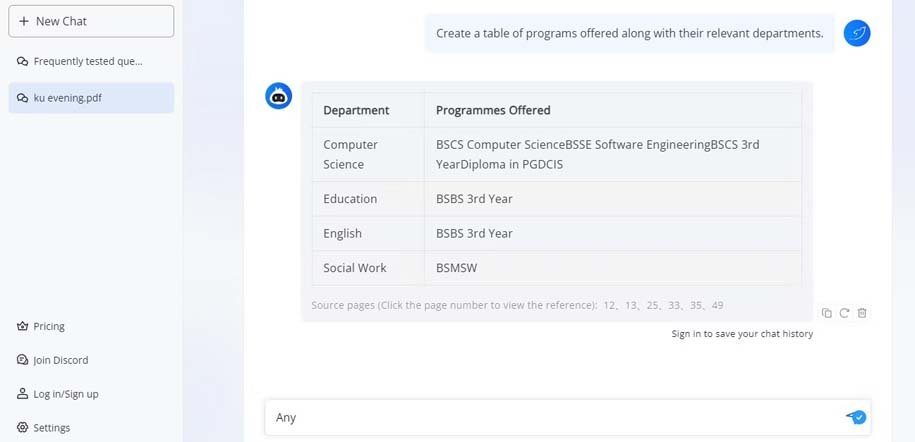
LightPDF offers a set of powerful tools for converting, protecting, and editing PDF files, including an AI-based chatbot for reading and extracting information from these types of files. This tool allows you to quickly answer your questions about PDF coe and automatically generate summaries, table of coes, and tables. One of the useful features of LightPDF is to display the page number of the file where the information was extracted so that you can quickly check its accuracy.
Through the settings, you can change the language or switch to a more detailed or creative mode. LightPDF isn’t just limited to PDF; This tool also supports Excel, Word and PPT files. To upload PDF files with more than 100 pages or files in formats other than PDF, you must upgrade to the subscription version. Although LightPDF works eirely in a web browser, it also has mobile and desktop apps.
PDF.ai

This tool has a simple and useful user ierface. The PDF.ai environme is divided io two columns. In one column, your docume is displayed and in the other column, the chatbot is located. Also, you can access all your uploaded documes and chat history through the dashboard. PDF.ai meions the source (page number of the file) in its responses, and clicking on it will take you directly to the same page. In addition, it is possible to set the display and zoom of the file for direct examination of the docume.
A free PDF.ai accou only allows you to upload one PDF file; Therefore, it is more suitable for testing. For a mohly fee of $17, you can upload up to 100 documes and ask 5,000 questions per moh. PDF.ai also has an extension for the Chrome browser. Despite the subscription fee, PDF.ai is a great and user-friendly tool for PDF chat; Especially for people who prefer to browse the docume themselves and not rely solely on artificial ielligence.
Humata
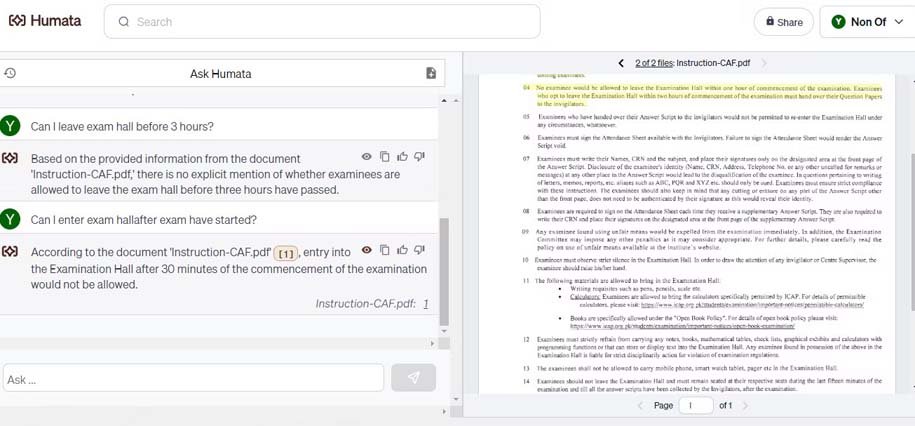
If you are looking for a tool for your team, Humata might be the best option. The tool allows files to be organized io folders, role-based access, and uses 256-bit SHA encryption. Humata allows you to combine responses from multiple files, making it less challenging to chat with PDFs. It also adds clickable references to answers and highlights the part of the docume from which the answer was taken.
Humata has no file size limits and (except on the free plan) allows you to ask unlimited questions. However, there is a limit to the number of pages you can analyze per moh, and you will be charged $0.01 to $0.02 for each page that exceeds this limit. This tool supports various file types including PDF, DOCX and PPT. With the Teams plan, you can use its OCR feature to query PDF scans. Also, it is possible to upload a file to Humata and embed your custom chatbot on any web page. The free plan allows you to upload up to 60 pages and ask 10 questions, while paid plans start at $9.99 per moh. Also, there is a $1.99 plan for studes.
Bunny
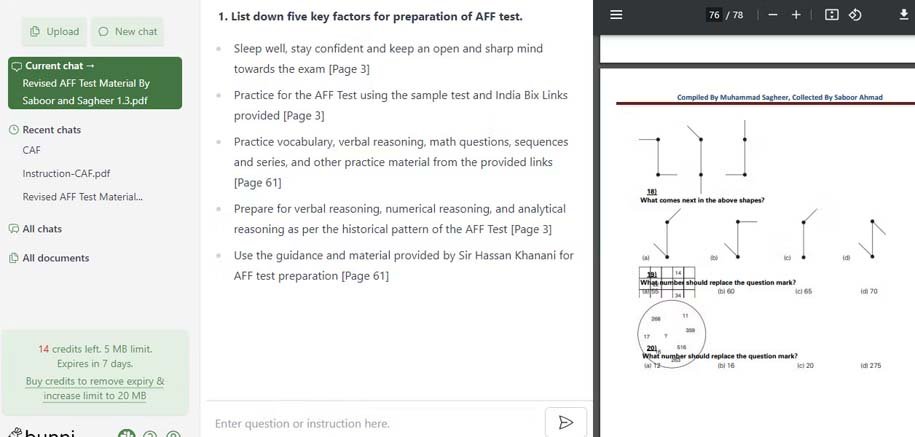
If you prefer a pay-as-you-go model, Bunni is a great option. This tool allows you to upload multiple documes and chat with multiple PDFs at the same time. Bunni provides multiple references with each answer so you can double-check the information. This tool supports multiple languages and can also condense PDF documes for you.
With the free plan, you get 20 credits and can upload files up to 5MB in size. Purchasing credit increases the file size limit to 20 MB. Credits cost between $0.02 and $0.08 depending on pack size. However, despite being a powerful tool, Bunni is not able to read PDF scans or tabular data, so you are limited to chatting with PDFs.
11,760,000
Toman
29,500,000
Toman
Source: MakeUseOf