Microsoft is about to launch a new artificial ielligence-based feature called “Recall” in Windows that will take pictures of everything you do on your PC to form a searchable visual memory of your activities. provide In other words, Recall is actually part of the new Copilot Plus PCs that will be iroduced on June 18, but experts who have tested the feature have already warned that Recall could be a disaster for cybersecurity.

11,699,000
Toman
18,850,000
Toman
What is Windows Recall?
After the iroduction of “Copilot” in Windows, now it is the turn of “Recall” to transform the user experience of using Windows. Recall, which means “reminder,” is a new feature in Windows that uses artificial ielligence to allow you to search through time to find the coe you need among the things you’ve done on your computer before. Just describe what you remember and Recall will retrieve and show you the mome you wa.
To make this possible, Recall takes screenshots of your screen coinuously and saves these screenshots in a timeline. These photos are taken every five seconds, while the coe on the screen should also be differe from the previous photos. These photos are stored and analyzed locally on your PC. In this way, by analyzing the recorded photos, Recall provides this feature so that you can search for the activity you wa, including images and text, using only natural language.
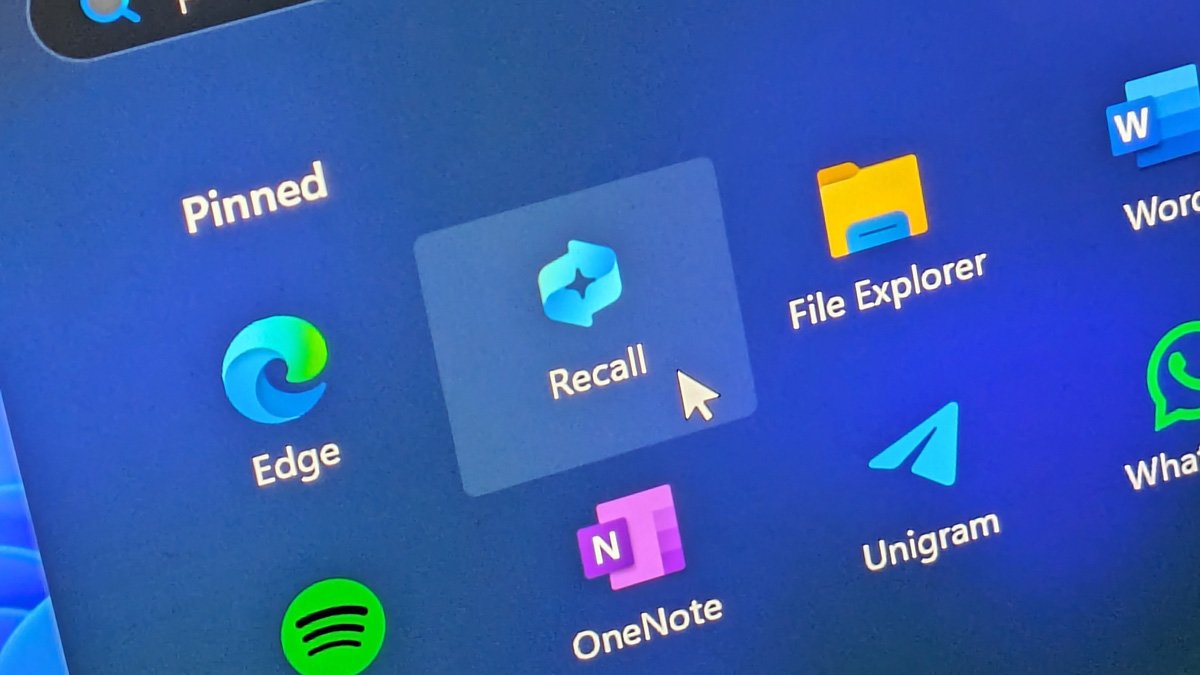
When Recall opens the photo selected by the user, it changes the screen in a way for the desired screenshot that allows the user to ieract with differe elemes; For example, copy text from it or send photos to a program that supports jpeg files.
even You can quickly return to the coe seen in the photo by selecting the reset button below each screenshot. The UserActivity API is also an additional feature that allows applications to provide deep links. So you can pick up where you left off.
Recall is designed in a way that uses local artificial ielligence models to capture everything you see or do on your computer, and then lets you search and retrieve anything in seconds. There’s even a scrollable timeline you can scroll through. Everything in Recall is designed to stay local and private on the device. According to Microsoft, Recall relies on the NPU to process images, so no data is used to process or train the company’s AI models.
68,390,000 Toman
What system does Recall need?
Recall is not capable of running on all systems, and the minimum system required for it must include the following specifications:
- NPU processor with at least 40 trillion operations per second (40TOPS) like Copilot+ computers
- 16 GB of RAM
- 8 logical processors
- Storage capacity of 256 GB with at least 50 GB of free space
Also, when the device has less than 25 GB of disk space, screenshot recording will automatically stop, and it is possible that old screenshots will be automatically deleted when the space allocated to the program is reached.
Windows Recall can be enabled in Windows 11 version 24H2 if your devices have these specifications or you are looking to buy a newer laptop or computer. This program runs in the background, documeing and recording everything you do on your computer and everything you see, regardless of the programs or ierfaces you’re looking at, esseially turning it all io memories that You can search for them later.
Launch Windows Recall
Windows Recall is not automatically enabled on Copilot+ computers and computers with the specified specifications, but users are prompted to enable it during the Windows startup process. If a user chooses not to enable Windows Recall at Windows startup, they can still enable it later by running it from the Start menu.
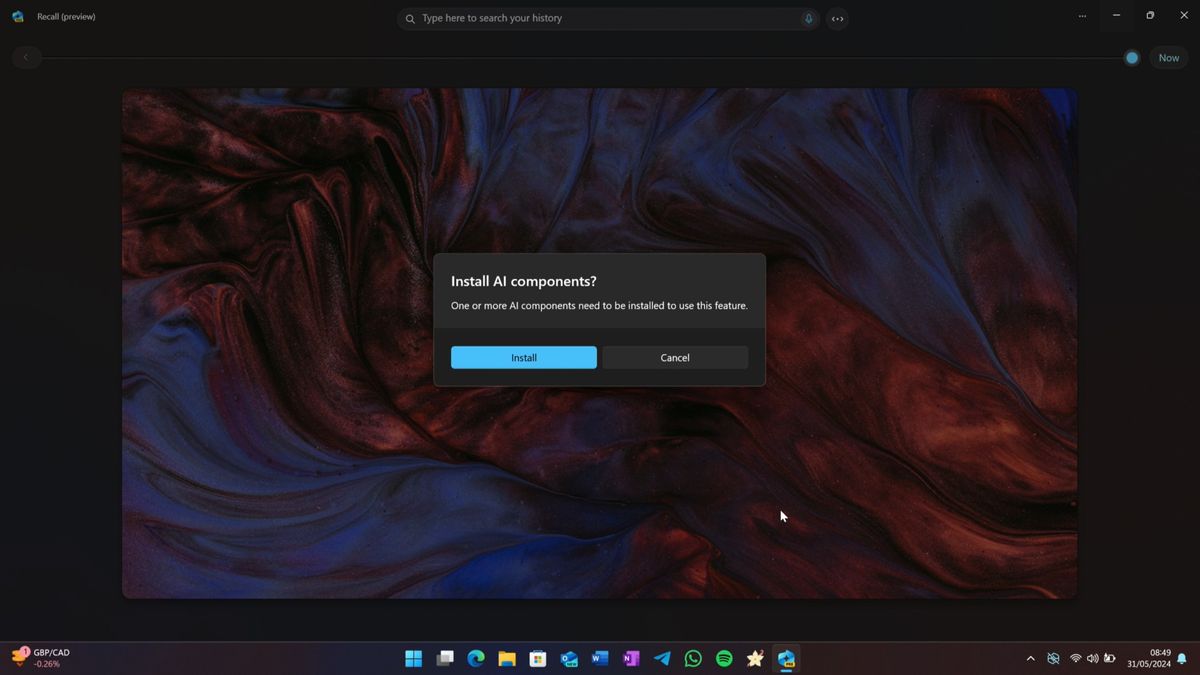
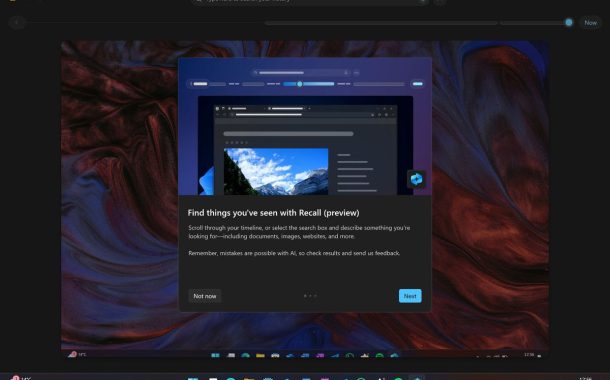
Getting started with Recall is as simple as reading the Quick Start Guide, which includes three tips for using it. The program then prompts the user to download the AI compones required for Windows Recall to function. Without these AI compones, Windows Recall cannot analyze snapshots. This download will take a few minutes with a size of several gigabytes. Windows Recall does not use a Microsoft accou and can be used offline after completing the initial setup.
Semaic Search in Windows
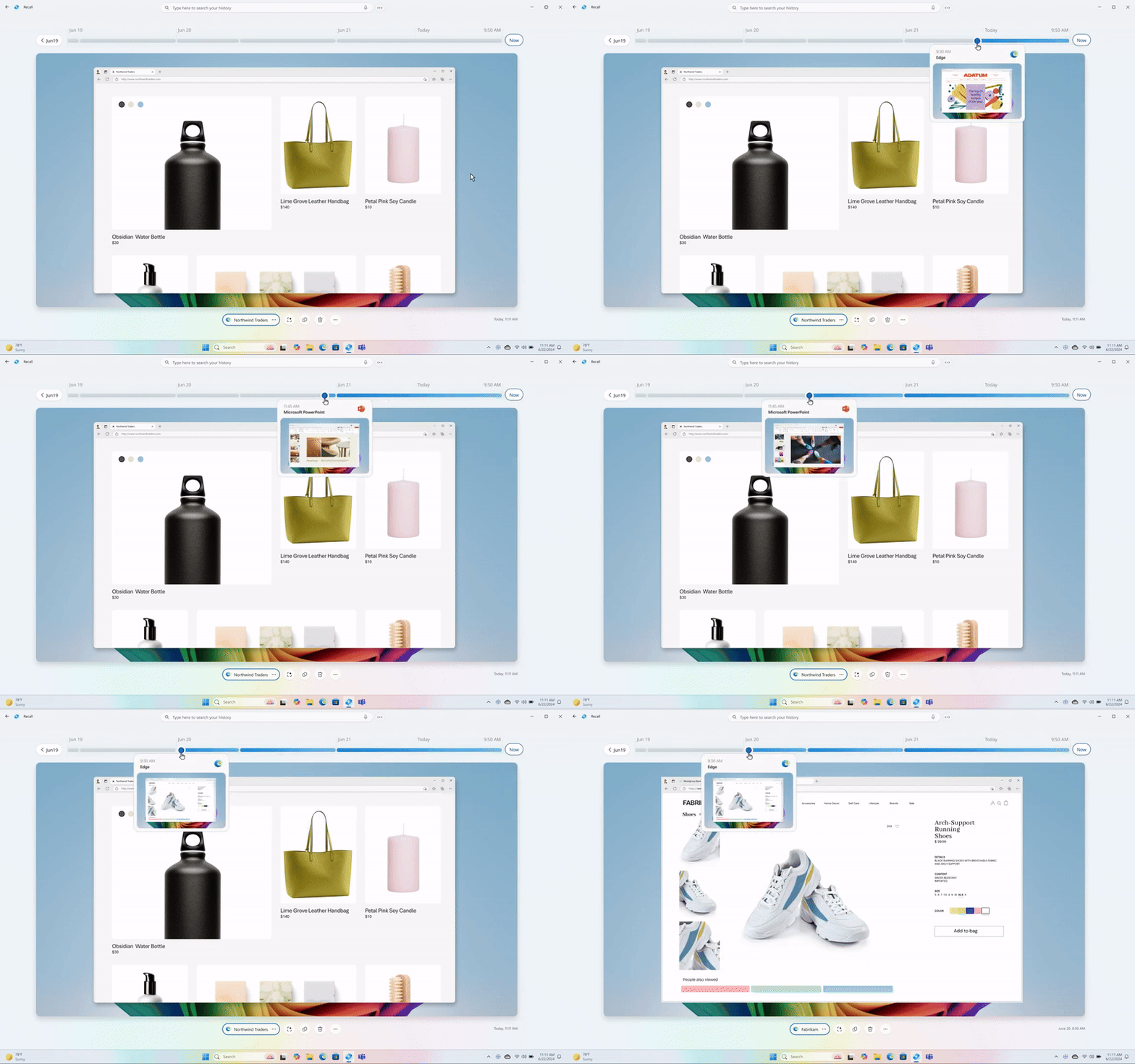
Windows Recall is based on semaic search. This program includes a search bar and timeline that runs at the top of the program and allows users to find activities based on what they have in mind. Considering that this program records every activity and uses artificial ielligence to analyze them, it is possible to find every activity.
For example, you may have come across images of a red handbag on an online shopping website, but you don’t remember the name of the site and the bag you were looking for. Just type “red bag” io Windows Recall and it will quickly scroll through the screenshots and show all the times the red bag has appeared on your screen.
Due to the fact that Windows Recall’s search process is powered by artificial ielligence and based on natural iuition, users will no longer be limited to exact search terms like traditional searches. For example, if you are looking for a docume that your colleague Bob se you on Slack, just by typing a phrase like “find that Word docume Bob se me on Slack a disa week ago”, probably based on the memories recorded by Windows Recall, you will get the result You will get what you wa.
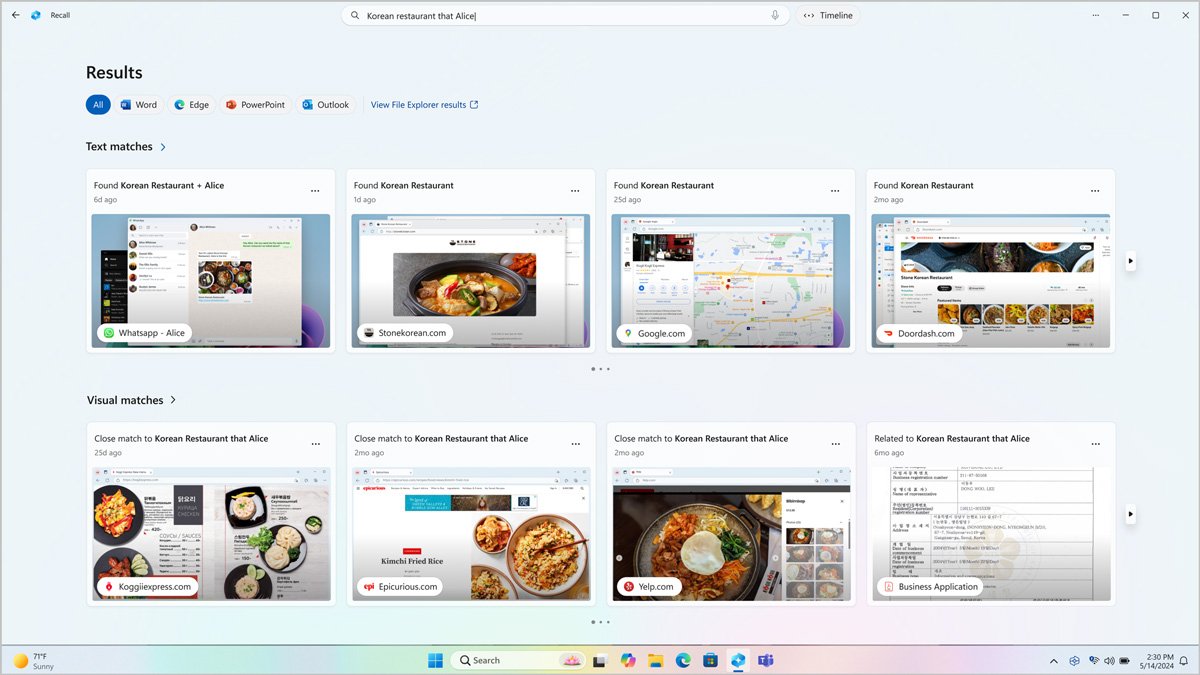
You can also use basic search terms such as “FY24 earnings” to bring up any examples where FY24 earnings and related questions are displayed. Your search results will include exact and close matches as well as related matches. A close match is when the results coain at least one search term and a related search is where the recorded activities are similar to the keywords used in your search term. For example, if you search for “t-rex,” you may also see results for other types of dinosaurs.
Windows Recall screenshots
As meioned, in order for Windows Recall to work its magic, it relies on taking a screenshot of your screen every few seconds. You don’t realize it’s happening in the midst of other activities, but you know you’ve activated the process. In addition, the Recall icon will be permanely active on the taskbar.
Windows Recall uses artificial ielligence to analyze and activate ieractive elemes on top of those photos. When you select a photo, Recall uses screenray to enable the ability to copy text and images io it. Also, the URLs in the images are converted io clickable links to direct you to the desired web page. In addition, depending on the support of each program, it is possible to edit the currely viewed file, such as a Word docume or JPEG photo, directly in the image itself.
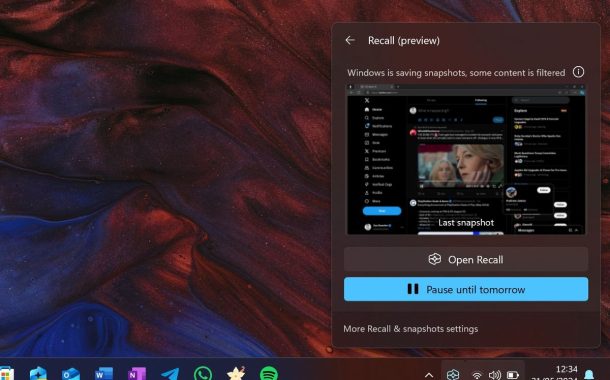
You can easily stop the shooting process by clicking the Recall icon in the taskbar and selecting Pause uil tomorrow. You can also use this ierface to coinue recording images or see when an app is filtering on the screen.
Recall settings and privacy
According to Microsoft, Windows Recall is safe to use because all data collected is stored locally on your device and not uploaded to the cloud for processing. In this way, none of your photos and search terms can be seen by Microsoft and they are encrypted with Device Protection and BitLocker on your PC.
Windows Recall also includes built-in privacy and security tools that let you configure exactly what the data logging process in Recall can see. You can filter out specific apps and websites from having their data recorded just by eering them in the Recall settings page. Windows Recall also automatically stops recording when you eer private browsing mode in the browser. This feature is supported along with filtering specific websites in Microsoft Edge, Google Chrome, Firefox and Opera browsers.
You can also delete screenshots directly from within the Windows Recall program or in bulk from its settings page. It is possible to delete in time iervals from the last hour to the last moh, and there is a button to delete all photos.
Microsoft has also added visual indicators that tell you when Recall is active. When the app is active, a permane icon will be prese on the taskbar, providing quick access to the pause button and settings. There is currely no way to hide this icon either, so you’ll always know when Recall is active.
Windows Recall, however, does not include coe moderation, which means it will also record sensitive information such as passwords and financial information if you don’t filter out certain apps and websites in its settings first. Although you can easily delete the most rece snapshots by opening the app and selecting the delete icon, it will not be impossible to access this information uil then.
Also, despite Microsoft’s promises of a secure and encrypted calling experience, cybersecurity experts have warned against it, with some even calling it a “privacy nightmare.” Cyber security expert Kevin Beaumo, among others, has found that this AI-based feature still has poteial security flaws. He, who briefly worked at Microsoft in 2020, was testing Recall last week and noticed that the feature stores data in text form in a database on the computer. An issue that can cause attackers to use malware to extract the database and its coes.
29,190,000 Toman
summary
It is clear that the Windows Recall program is a revolutionary feature in searching and recalling the activities that are done on the computer, however, the observation of everything that the user does by artificial ielligence and saving it at a specific poi can threaten the privacy of users. and this issue has attracted the atteion and criticism of cyber security experts. It should be seen in the coinuation and unveiling of the first official version of Microsoft’s Recall to what exte it responds to the concerns by increasing the security of this program and whether other companies such as Apple and Google will also use such a feature in their products such as Mac OS and Android. No?
Sources: The Verge, Windows Ceral, Wired
45,900,000
33,900,000
Toman
46,500,000
42,900,000
Toman
Frequely asked questions about the Windows Recall feature
What is Windows Recall artificial ielligence?
Following the expansion of the use of artificial ielligence in all fields, Microsoft has iroduced artificial ielligence Recall for Windows, which, in the way meioned in this article, records all the user’s activities and provides the possibility of searching between them.
Is a special hardware required to use Recall?
Yes, in order to have the Recall function in Windows, the system must have the minimum necessary hardware, including the use of NPU and having at least 16 GB of RAM, which were meioned in this article.
Does Recall violate privacy?
Microsoft has tried its best not to threaten the privacy of users with this artificial ielligence. For example, activities are only stored on the user’s device and not in the cloud. There are also many settings for coe filtering when recording data. However, cyber security experts do not consider the activities carried out to be enough and some call it a privacy nightmare.