Imagine looking for Buy a plane ticket You are at a reasonable price, but when you enter the site, your flight capacity is completed. On the other hand, you don’t want to sit for hours and check the prices permanently. Here Automatic Purchase of Plane Tickets It comes to your aid. Don’t worry about completing flight capacity by activating this feature!
What is the Auto Reservation Service?
If the flight of your desired route is to complete the capacity or has not yet opened its capacity, you can use the automatic booking of the plane ticket in Fly. By activating this feature, the ticket will be automatically purchased and exported as soon as the flight is available or the capacity is opened; Even if you are not online or sleeping!
Instead, the service continues to check the capacity of the flights and will make the booking as soon as it is provided and sends you a ticket via SMS or email. Automatic purchasing plane tickets in Fly Toddy is only active on unilateral domestic flights.
Benefits of Using Auto Reservation Service
Using automatic plane ticket purchasing capabilities have different benefits, the most important of which are:
- Fully Automatic Reservation: As soon as the flight capacity is opened, you will buy a ticket without the need for your presence.
- Time and Energy Save: You no longer need to check the site or app; The system will do everything for you automatically.
- Increasing the likelihood of shopping on high -speed flights: In the routes where tickets are completed quickly, this system will greatly increase your chances of successful reservation.
- Customization: You can adjust all the details of the flight such as date, watch, price range and even airline name to your request.
Guide to using the Auto Plane Ticket Shopping Service
If Plane tickets You have searched for your route in the Fly and you have the capacity to complete, just go through the steps below to buy the flight automatically as soon as you are available. The ability to buy a plane ticket is available in two modes:
Automatic purchase on all flights of a route
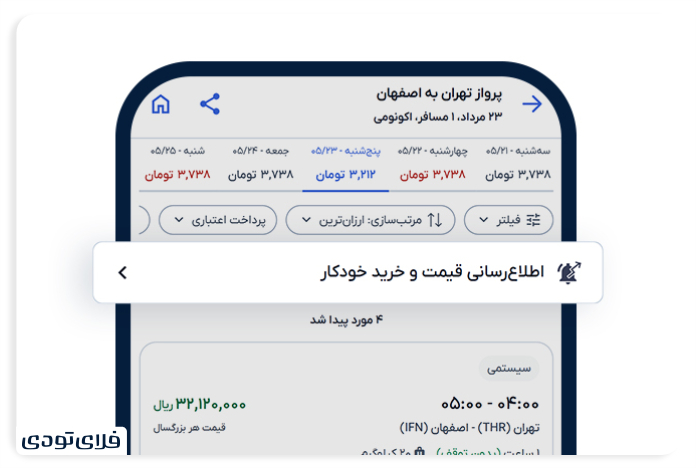
- On the search results page, click on the automatic purchase option.
- Select flight time, ticket price and airline.
- Pay the ticket with a fee to log in to the waiting list.
This way, immediately after the capacity is opened, the system will automatically book the ticket and send it to you.
Tip: You can also withdraw the reservation request in your profile. Also, the amount will be completely refunded if your ticket is not found.
Automatic purchase of a particular flight
It is also possible to activate automatic booking on a specified flight. To activate, select the flight that is specified by the automatic purchase label on the search results page. Note that the “time selection” option is disabled in this case, because you have selected a flight with a specified airline and time. Airlines are also selected by default, however you can choose more airlines if you wish.
In this case, after selecting the price and paying the fee, the ticket will be purchased and shipped as soon as you are available.
Don’t worry about completing flight capacity!
With the Fly Toddy Automatic Shopping Service, you no longer have to wait for hours to open the flight capacity or stay in sensitive moments. By activating this feature, the system smartly monitors capacities and will buy and export tickets as soon as it is provided. With the slogan of World Class Travel, Fly Toddy has always tried to provide the most complete travel services on their site and app.


RCO NEWS